
|
Microsoft Office 365 and SharePoint have a natural fit for contracts management because these two applications have the collaboration, security, and storage features that are required to be implemented into a contract workflow. These features are Azure Active Directory single sign-on for the same access control across all services, central document management on SharePoint with version control, 99.99% uptime service level agreement (SLA), collaborative authoring by legal and procurement departments, contract management performance tracking through Power BI analytics, security including multi-factor authentication and data loss prevention, and e-signature integration with DocuSign, among others. Implementation of a contract lifecycle management system based on SharePoint on your existing infrastructure saves money on duplicate software and is easy to implement because your team is already using these applications. |
SharePoint Contract Management is an innovative solution that utilizes collaborative capabilities of Microsoft Office 365 and SharePoint Online for the effective and efficient management of contracts. These tools have a global reputation for being used for the storage of huge amounts of confidential information, which makes them suitable for managing the contract lifecycle.
SharePoint Contract Management allows for improving visibility and accountability in the process of contracting thanks to a proactive contract dashboard that displays lifecycle status, upcoming important events such as expiration and automatic renewal of the contract, and remaining tasks. Savable search filters that can be customized provide fast access to needed contracts, clauses, and documents despite the time pressure caused by the negotiations stage. Workflow automation ensures standardized approvals, negotiations, and reviews and routing the contracts to the appropriate person.
The main benefit of the approach is that all of the above tasks are managed in one system and not in separate emails and drives, thus, saving time and money.
Here's how a CLM with SharePoint stacks up against a standalone third-party CLM before we delve into the specific advantages:
|
Capability |
SharePoint-Based CLM (Dock 365) |
Standalone Third-Party CLM |
|
Login |
Single sign-on via Azure AD |
Separate credentials required |
|
Storage |
SharePoint document library (existing infrastructure) |
External cloud storage |
|
Security |
Microsoft enterprise-grade (MFA, DLP, audit trails) |
Varies by vendor |
|
Collaboration |
Native Office 365 co-authoring, Teams integration |
Requires integration setup |
|
Adoption |
Familiar Microsoft interface |
New UI requires training |
|
Cost |
Leverages existing Microsoft tenant |
Additional licensing cost |
|
E-signatures |
Integrates with DocuSign, Adobe Sign |
Varies by vendor |
With the CLM from Dock 365, a single login into your Office 365 ecosystem will do. It comes with a single sign-on via Azure Active Directory to provide profile-based access to Office 365 apps instead of managing different credentials on different platforms.
As Dock 365 uses SharePoint and Office 365, it allows users to have everything related to contracts stored in one central place. Contract documents, milestones, and other files will be available for searching and filtering from any device and location.
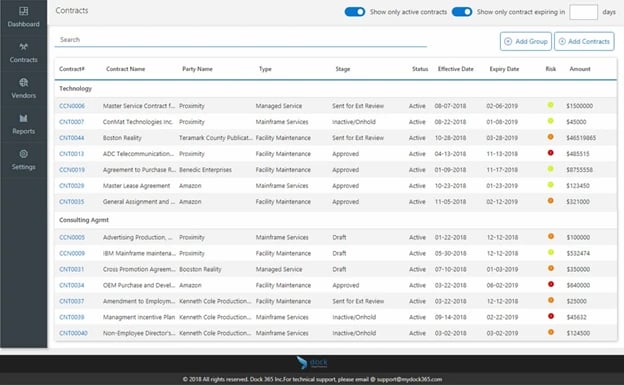
Dock Contract Management System - Contract List
Office 365 guarantees 99.99% uptime with financial backing, and contracts remain accessible even during any outages or disruptions via SharePoint Backup and Restore.
Employees will be able to work on the same contract at once irrespective of their location and device used, check-in/check-out ensures the version control, and vendors or suppliers will be provided guest access for reviews.
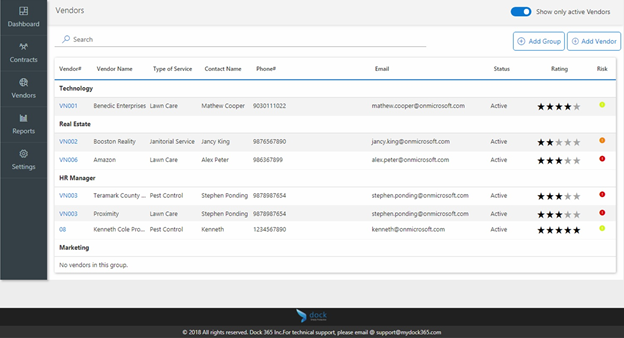
Dock Contract Management System - Vendors List
The integration of Power BI allows users to have a full 360-degree view of performance information, creating interactive reports with the ability to track KPIs and analyze the state of the contract life cycle.
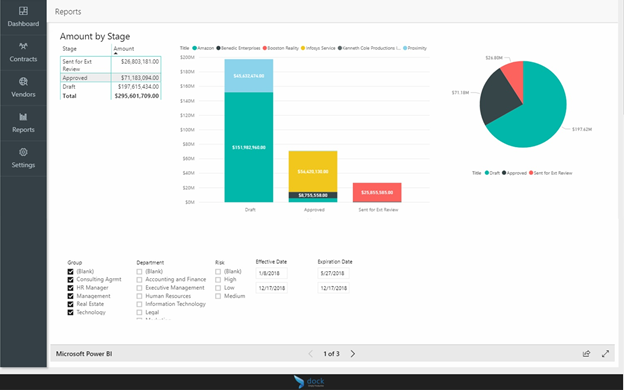
Dock Contract Management System - Reports
Multi-factor authentication, encrypted e-mails, data loss protection, and audit logs make Office 365 and SharePoint one of the most secure environments for contract management.
The simple and visually pleasing interface of SharePoint, coupled with numerous online resources, reduces the need for lengthy training on the software and focuses more on business objectives.

The Dock 365 application updates itself with new versions of Office 365 programs, which makes the software up to date all the time. The Dock 365 application can be accessed via cloud service and works for smartphones and tablets, too. It can be installed on 5 computers or laptops.
The Dock 365 company creates intranet solutions that will add to Microsoft Office 365 and SharePoint, increasing employees' productivity and collaborative contract management.

Standard SharePoint does not contain those capabilities that the software Dock 365 brings that eliminate guesswork in the process of contract management. In case if your company uses standard SharePoint intranet portal for documentation management, then you will face difficulties customizing contract workflows.
|
Feature |
Standard SharePoint |
Dock 365 CLM on SharePoint |
|
Contract intake forms |
Not included |
Customizable guided questionnaires |
|
Automated approval workflows |
Manual configuration required |
Pre-built, configurable CLM workflows |
|
Renewal alerts |
Not included |
Automated email notifications |
|
Contract dashboard |
Not included |
Lifecycle status dashboard with KPIs |
|
E-signature integration |
Not included |
DocuSign, Adobe Sign integration |
|
Clause library |
Not included |
Searchable clause and template library |
The Dock 365 contract management system based on SharePoint technology offers advanced security capabilities. Permissions can be set at the file, folder, library, or site level so that confidential contract details remain accessible only to authorized users. Role-based access control is especially useful in cases where contract data contains commercially sensitive information, personal identification numbers, or regulated data.
Curious what this looks like inside your own Microsoft 365 tenant? Book a demo with the Dock 365 team and see it running against your actual contracts.