Content
- Top 8 Contract Management Software Platforms in 2026
- What does the Contracting Process involve?
- What is Contract Management Software?
- Who needs Contract Management Software?
- What are your Contract Management needs?
- What Are the Main Features to Look for in Contract Management Software?
- How to Choose the Best Contract Management Software for Your Organization
- Conclusion
|
Choosing the best contract management system in 2026 will depend on what tech stack your company uses and how big your company is. For those who are using Microsoft 365, Dock 365 will be the top choice. This solution was natively built on SharePoint and it integrates into Microsoft Teams and Word. Drafting happens in Word and e-signature in DocuSign or Adobe Sign, meaning that there's no additional login to worry about. Enterprises with more complex approval chains usually go with DocuSign CLM or Icertis. For companies led by legal department, the choice would fall to Ironclad. For those who need something quick to set up, ContractWorks and Concord will suffice. Missing renewal dates and contracts lingering in email boxes might cost your business a lot of money, therefore choosing which platform to use is not an insignificant choice. This guide compares 8 leading solutions and their features. |
Best Contract Management Software in 2026: Quick Comparison
|
Platform |
Best For |
Microsoft 365 Native |
E-Signature Built-in |
Starting Price |
|
Dock 365 |
Microsoft 365 organizations |
Yes (SharePoint-based) |
Via DocuSign / Adobe Sign |
Contact for pricing |
|
DocuSign CLM |
Large enterprise |
No |
Yes (DocuSign native) |
Contact for pricing |
|
Ironclad |
In-house legal teams |
No |
Via integrations |
Contact for pricing |
|
Agiloft |
Deep customization needs |
No |
Via integrations |
Contact for pricing |
|
ContractWorks |
Fast deployment / SMB |
No |
Via DocuSign |
From ~$700/month |
|
Concord |
High-volume negotiation |
No |
Built-in |
From ~$399/month |
|
PandaDoc |
Sales-driven contracts |
No |
Built-in |
From $35/user/month |
|
Icertis |
Global enterprise CLM |
No |
Via integrations |
Contact for pricing |
Top 8 Contract Management Software Platforms in 2026
1. Dock 365: Best for Microsoft 365 Organizations
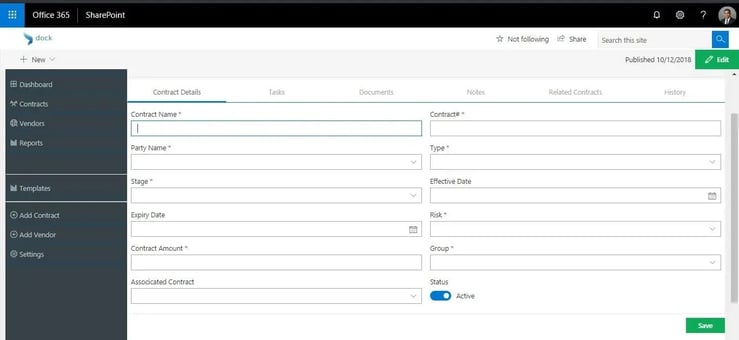
Dock 365 is an end-to-end contract lifecycle management software based directly on Microsoft SharePoint and Microsoft 365. The vast majority of CLM solutions force your organization to introduce an entirely new set of systems: new login, new storage space, new tool to use. Dock 365 avoids this requirement altogether. Our solution works seamlessly within the Microsoft ecosystem used by your lawyers, procurement specialists, and sales reps.
Key Features:
Contract storage system based on SharePoint with zero separate systems to manage, data migration, or additional logins
-
- Drafting and redlining using Microsoft Word, not a separate editor
- Approval workflows automated via Microsoft Power Automate
- Integration with DocuSign and Adobe Sign for electronic signatures
- Review and action contracts from Microsoft Teams without changing tools
- Works with Dynamics 365, Salesforce, Oracle NetSuite, and Business Central
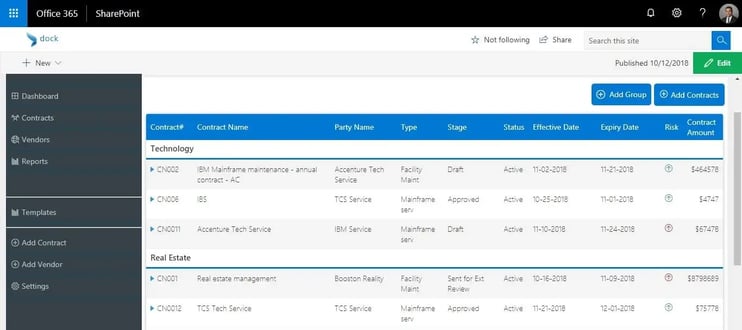
- Vendor management: monitor vendors and counterparties along with their contracts, so procurement has a single unified view of vendor relationship and performance
- Organizational flexibility based on programs, business units, or categories: organize contracts according to the actual structure of your company
- Visibility of total cost and risks: roll up value, obligations, dates of renewal, and any risk factors for programs or vendors in one view to help leadership assess exposure
- Audit trail of all actions: all activities for each contract are automatically tracked, making Dock 365 compliant with procurement audits, compliance reviews, and litigation
- Contract data stays within your own infrastructure: dock 365 keeps contracts and their data within your Microsoft 365 tenant and does not store or process your data on any external third party servers
- Portability and storage of contract data: your contract data stays in your hands and Microsoft 365 environment and is portable even when you stop using Dock 365, pricing depends on number of users and required features, please contact Dock 365 for a personalized quote
- Obligation tracking and customizable renewal alerts will keep deadlines in check
Best For: Medium and enterprise companies operating on Microsoft 365 who need CLM, vendor management, and visibility into their portfolio costs and risks through an audit trail, resident tenant data, and no lock-in should they choose to move away. You can read verified reviews by real customers on G2.
Pros: Tight Microsoft 365 integration, vendor and contract management on one platform, program structure customization, portfolio cost and risk visibility, complete audit trail, data resides in your tenant, no exit lock-in, user-friendly tools, fast deployment.
Cons: Needs pre-existing Microsoft 365 subscription; not a good choice for Microsoft outsiders.
2. DocuSign CLM: Best for Large Enterprise
The DocuSign CLM solution is the contract lifecycle management offering from DocuSign, the firm most well-known for its e-signature service. The CLM platform from DocuSign uses its e-signature expertise to provide comprehensive coverage of the contract lifecycle in large enterprise firms.
Key Features:
-
- Contract lifecycle management from start to finish
- Built-in DocuSign e-signatures
- AI-enabled contract analysis
- CRM integrations, including Salesforce
- Workflow automation
Best for: Enterprises already implementing e-signatures through DocuSign that are ready for CLM.
Pros: Excellent e-signature functionality, enterprise-grade security, top-notch Salesforce integration.
Cons: Expensive, complex to implement, not for small businesses.
3. Ironclad: Best for In-House Legal Teams
Ironclad is a digital contracting solution designed to cater to the needs of in-house legal teams. It has been acknowledged in Forrester's contract lifecycle management study for its legal-first workflows and is widely known on the market for the intuitive no-code workflow designer and collaboration between the legal and business departments.
Key Features:
-
- No-code workflow designer for contract processes
- Document repository with advanced AI-powered search
- Tools for collaboration between legal and business departments
- Reporting and analytics dashboard
- Integrations with Salesforce, Slack, and Google Workspace
Best for: In-house legal teams working with large contract volumes to accelerate time-to-signature.
Pros: Great legal team UX, great reporting, fast-to-implement workflows.
Cons: High price tag; not a native Microsoft 365 solution.
4. Agiloft: Best for Deep Customization
Agiloft is a customizable CLM solution which can be configured in great detail by legal, procurement and IT departments. It is famous on the market because of its no-code configurator and AI-driven contract analysis.
Key features:
-
- No-code/low-code configurator
- AI contract analysis and risk scoring
- Good audit trails and compliance tracking
- Pre-integration with Salesforce, SAP and ServiceNow
Best for: Companies with complicated and non-standard processes of handling contracts who prefer a solution they can configure to reflect the exact process, not vice versa.
Pros: Very flexible, compliant and advanced AI functionality.
Cons: Requires significant effort to configure; steeper learning curve compared to more basic solutions.
5. ContractWorks: Best for Fast Deployment
ContractWorks, which is owned by Onit now, is a simple and easy-to-use contract management solution focused on storage, tracking and notifications. It is created to help a company to start working with it quickly and without long and boring implementation process.
Key features:
-
- Contract repository
- Full-text searching through contracts
- Renewal and expiration notifications
- DocuSign integration for digital signing
- Reporting
Best for: Legal and operations teams who need an effective repository and alert system, but not necessarily complex workflows.
Pros: Quick implementation, user-friendly software, predictable pricing.
Cons: Not ideal for legal teams who have complex workflow needs or need heavy customization.
6. Concord: Best for Collaborative Negotiation
Concord is a contract management platform with an additional negotiation and collaboration module. The software caters to businesses that frequently negotiate contracts and would like everything from drafting to finalizing to happen on a single platform.
Key features:
-
- Contract editing and redlining in-platform
- e-Signature
- Version control
- Library of templates
- Public and private commenting while negotiating
Best for: Legal teams that handle a large volume of contracts that are negotiated externally, and would like to streamline the whole process in one platform.
Pros: Built-in negotiation modules, great value for volume contract teams, easy collaboration with external parties.
Cons: Does not include post-award management or obligation tracking features found in enterprise-level CLM platforms.
7. PandaDoc: Best for Sales-Driven Contracts
PandaDoc is a document automation platform, which handles the entire process from proposals to quotes to contracts, all in one workflow. Popular among sales-driven legal teams.
Key features:
-
- Drag-and-drop document builder
- Embedded e-signature feature
- CRM integration (Salesforce, HubSpot, Pipedrive)
- Automatic payment collection
- Analytics for document open rate and time spent reading documents
Best for: Sales teams looking to automate proposals-to-contracts process within CRM.
Pros: User-friendly software, good sales integrations, both proposal and contract functionality.
Cons: Does not have full CLM functionality, weak post-award management for legal and procurement scenarios.
8. Icertis: Best for Global Enterprise CLM
Icertis is an enterprise-class CLM software designed specifically for multinational corporations with sophisticated compliance needs. It is frequently mentioned as the leader in terms of artificial intelligence and rich integration capabilities into SAP, Salesforce, and Microsoft Dynamics.
Key features:
-
- Contract intelligence powered by AI
- Multi-language and multi-currency support
- Integrations with SAP, Salesforce, Microsoft Dynamics
- Risk and compliance management
- Advanced analytics
Best for: Multinational corporations managing a large number of contracts in different countries.
Pros: Industry leader in AI and compliance features, rich integrations.
Cons: Available only for enterprises, requires substantial implementation expenses.
What Does the Contracting Process Involve?
Contracting processes can be complex and vary from one project to another; however, the cycle involved remains relatively stable in most cases. It includes intake and requests, authoring and signature, fulfillment, and renewal when the contract expires.
During the initial stage of the process, one should look for a vendor or business partner whose preferences and conditions define the further course of negotiations and drafting. Once one knows the possibilities available, he can collaborate with his team to develop the initial draft of the agreement.
The negotiation process involves setting the key terms of the agreement including deliverables, contract terms, price structure, and payments. After the signature of the contract, it moves to the fulfillment stage where the parties execute the agreement. Any adjustments that need to be made at that stage are included in it.
Renewal is the final stage where each party should renew the agreement under the same terms or re-negotiate them to include changes. Renewal becomes problematic because most companies forget about the auto-renewal clause or overlook it.
What is Contract Management Software?
A contract management software manages all processes involved in the signing of a contract. This means that rather than going through email correspondence and shared files trying to locate different versions, you are able to create, manage, draft, execute, and maintain all your contracts using one platform without much manual effort.
It is quite common for companies to focus most of their attention to the negotiating and signing processes of contracts and ignore what happens after a contract is signed. A contract management system solves that problem by bringing together various disparate systems and thus ensuring that the contracts and other relevant information remain accessible to everyone. A cloud-based, centralized system where you have advanced search and filters ensures that all documents remain easily accessible to you.
Streamlining Each Phase of the Contract Lifecycle
Contracts are the backbone of virtually any business relationship, so it makes sense to try and optimize the process in any way possible. Not only does contract management cover the signing process, but it also involves keeping track of all the information contained in it long after its execution.
Pre-Award
In this phase, CMS allows for minimizing contract drafting through the use of predefined templates and clauses that are available for easy reuse. Rule-based automation and auto-filled metadata allow streamlining contract creation, while cross-department cooperation becomes much easier.
Award
In this phase, the software facilitates version control by allowing all parties to edit and comment upon one online file, which is important to keep communications concentrated and reduce turnaround time. Most of the platforms support major e-signature applications to facilitate signing process even further.
Post-Award
This phase is when software monitors the development, performance and current state of the contract. It ensures proactive completion of milestones and obligations by alerting the proper people about important dates like auto-renewal or approvals.
Renewal
When renewing a contract, the software will help you prepare for the next term using automated alerts and data. Audit trails provide the ability to check how the contract performed and evolved through previous renewal processes.
Who Needs Contract Management Software?
During its life, the contract passes through numerous departments such as HR, finance, procurement, sales department, among others. Each transfer may end with a loss of the contract.
Procurement Department
The Procurement department finds and develops supplier/vendor relations and negotiates with them terms of the contract. The use of CMS accelerates the process because of compliance monitoring, preapproved clauses/templates, etc.
Legal Department
The Legal Department checks the accuracy of the contract and compliance with laws. The process supported by CMS reduces risks significantly and raises the level of compliance due to the ability to detect the problematic issues quickly rather than reading all the clauses.
HR Department
Usually, most of the contract management systems facilitate the process of hiring and onboarding as they store all employee contracts including NDA and offer letters.
Finance Department
Finance relies on CMS to identify underperforming services and uncollected revenue. Digital and automated workflow processes ensure that the department is proactive in its approach, rather than reactive, when it comes to due dates and payments.
What Are Your Contract Management Needs?
Contract management of a large number of complex contracts can be overwhelming even for the largest companies. It would be reasonable to think about the requirements before jumping onto features comparison. Ask yourself:
- How many contracts per year is your organization working with?
- What kind of contracts is your company managing (vendor agreements, employment contracts, NDAs)?
- Who will be using the software, and for what purposes?
- Do you require integrations with existing software (CRM, ERP, accounting software)?
- What are the compliance/regulatory requirements?
What Are the Main Features to Look for in Contract Management Software?
Digitized contracting helps in securing more revenue by automating and streamlining your processes and lifecycle of your contracts. Usually, there is also an AI tool available which allows getting analytics about performance of your contracts and making decisions backed up with statistics.
Save Time While Drafting Contracts
Specific contract management software streamlines the process of drafting each new contract. Using pre-approved templates and clauses allows you to automate and accelerate the process of creating the right contract.
Enhanced Cross-departmental Collaboration
The ability to control the document version is one of the key capabilities of any CMS. This means that multiple departments' representatives can collaborate on one contract and edit it at once, and there will be no concerns related to using outdated versions of the agreement.
Search Capabilities
Each piece of legal contract management software includes customizable filters that can be reused. Additionally, text search will help find the contract in a matter of seconds among a large number of contracts.
Increased Security
In many cases, contracts include sensitive and confidential information. The use of audit trails, encryption both at rest and transit, and other security tools provides you with the most risk-conscious approach to handling contracts.
Digital Repository
Thanks to cloud storage and security, you will not have to worry about the possibility of contract misuse. Each contract will be saved and archived in the digital repository.
Scalable
Contract management software designed to scale, maintaining consistency of contract speed, accuracy, and productivity even as the business grows.
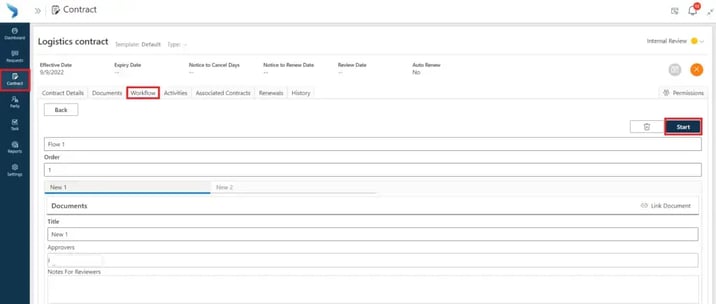
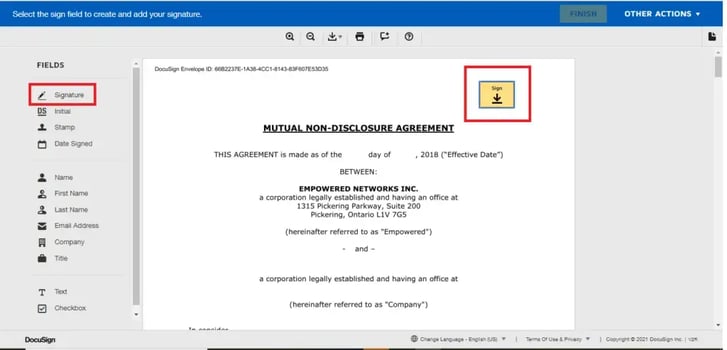
Faster Signing
DocuSign, Adobe Sign, and the other top names in e-signatures help to streamline the process of contracting, speeding up the process overall.
How to Choose the Best Contract Management Software for Your Organization
Choosing contract management software isn't always black and white. Consider these factors when selecting a system:
- Compatibility with your current technology stack If you already use Microsoft 365, Dock 365 is an ideal choice that doesn't involve having another login system, another data silo, and another set of training. If your organization prefers Salesforce, DocuSign CLM or Ironclad offer better integration with Salesforce.
- Team size and volume of contracts For smaller teams handling simple contracts (less than 500 per year), ContractWorks or Concord can provide tremendous value. For larger organizations handling complex agreements with multiple parties, an enterprise-grade platform like Icertis or Agiloft is recommended.
- Know who owns contracts in your organization Legal-driven contract management practices should prefer platforms such as Ironclad. Sales-driven organizations will usually be happy with PandaDoc. Cross-functional CLM process that involves collaboration between legal, procurement, and finance requires a full-stack platform such as Dock 365 or DocuSign CLM.
- Assess time-to-value and total cost Implementing certain platforms might require weeks, others require months. ContractWorks and Dock 365 are known for their fast deployment, whereas enterprise platforms such as Icertis require multiple month implementations. Consider the total cost of ownership when making your choice – not only the cost of the software itself but also its implementation, training and user license fees. A cheaper-looking platform might actually cost much more once you factor in the delay in rollout and unforeseen licensing tiers.
- Make sure your approach to signing documents is accommodated Most CLM platforms either have an integrated e-signature or support DocuSign and Adobe Sign.
Conclusion
An improved contract management system will reduce your time wasted, decrease costs and give you more value from the existing contract agreements. Dock 365 handles many of the repetitive lower-level functions that are consuming the week of your legal or procurement team right from within the Office 365 and SharePoint suite you’re currently using. It's an efficient solution to gain control over the existing contract portfolio.
Want to see how it operates in your own Microsoft 365 instance? Schedule a demonstration by the Dock 365 team.
.webp)