

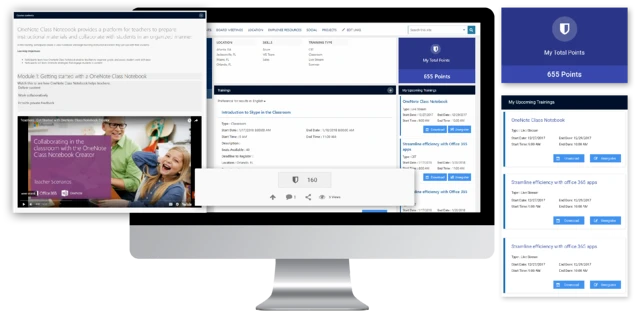
As technology grows and develops, it’s becoming more important to consider incorporating it into your credit union. The concept of the technology can be both scary and exciting, but with the help of a technology partner like Dock, the transition will be a breeze.
Why Incorporate New Technology
Your credit union probably has a set of business practices that generally work for you. There are probably countless binders and handbooks, one for each employee’s desk, that ensure compliance and meet regulations. This is your status quo and at first glance, there may not be a reason to change it.
Technology can do a lot of things for your business. By implementing new and evolving technology, you will empower your team to be more efficient than ever before.
Intranet Capabilities
Document Search
By making documents searchable, you no longer have to rely on human capabilities to find all the information about any given regulation. Imagine, an employee has a question about a law or procedure and they can use an internal search engine (like Google but just for your company) that delivers the answer instantly.
In this modern area of technology, information is instantly accurate around the world and it should be for your company too. Dock’s SharePoint intranet enhances your search capabilities by allowing your team to search by words contained in documents as well as document subject, tags, document types and much more. Enhanced search takes the guess work and human error out of important research.
Read more: How to Improve Employee Productivity in Your Credit Union
Workflows for Compliance
For every process in your credit union, there is a step-by-step system of procedures to make sure your work is compliant. When a new client wants to take out a car loan, your employee enters into a workflow. They collect information, send it to an underwriter, the underwriter either approves or declines and sends their answer back to the employee, the employee gives the information back to the clients, and on and on, like a game of tennis.
How do you ensure this process is performed seamlessly and without error? Training? Cheat sheets? Automated workflows are the perfect technological solution to ensure your employees never miss a step. Turn your game of tennis into an automatic process. A workflow triggers every step of the process automatically, based on the result of the previous step.
Choosing Your Technology Partner
Choosing an intranet means more than picking the first one you see. You need to ensure your data will be secure, the features will be customizable and, perhaps most importantly, that you’re working with a team that will view your company as a partner, not just a number toward their revenue.
Dock promises all of that and more. We’re not just an intranet company, we’re a business just like yours. We know what it takes to keep a business running and we’re ready to help elevate your team to the next level.
If you're looking for a dedicated information technology portal, you can find more information on our website .
Want to see Dock in action? Schedule a demo with one of our SharePoint experts to see a live demo of Dock and experience how we’ll transform your credit union.


_11zon-1.webp)

