
Well, this requirement came up for one of our Client that is a Marketing Agency based in Jacksonville, FL. They have a SharePoint list to save external URLs that is used by their team across the United States. Usually, when you convert the URLs from external sources, it comes with special characters like !@$#>% and couple of others. That’s when we found a way to convert such strings into a URL friendly string with the help of Microsoft Flow. Let’s see how this works:

You can rely on the Replace function available in Microsoft Flow. This helps you to replace character by another one. In this scenario, we need to replace the special characters with a blank space. When this is done for each character at a time, you can nest them and you will get all the information in a single function.
Let’s create a Title dynamic property with the trigger of characters: [ ] ~ { } ^ ! , . % # * < > ? / ” @ & = / ; |) \
Copy the below code:
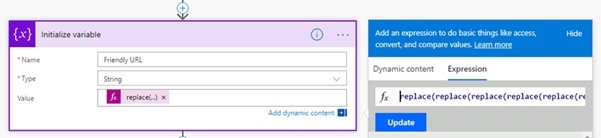
replace(replace(replace(replace(replace(replace(replace(replace(replace(replace(replace(replace(replace(replace(replace(replace(replace(replace(replace(replace(replace(replace(replace(replace(replace(replace(triggerBody()?['Title'],':',''),'%',''),'#',''),'*',''),'<',''),'>',''),'?',''),'/',''),'"',''),'"',''),'@',''),'&',''),'=',''),'/',''),';',''),'|',''),'\',''),'[',''),']',''),'~',''),'{',''),'}',''),'^',''),'!',''),',',''),'.',''
As you see below, a quick Flow can be setup for you to see the results. A 3-easy step procedure and we can get this done in minutes!
- When item is created
- Initialize Variable
- Update Item
Now create a Variable with Friendly URL and update item:
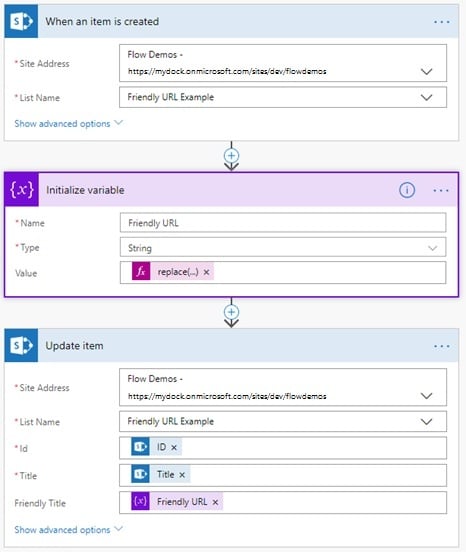
The variable values are the formula we had mentioned earlier, so make sure to update it with the actual string which you need it to be fixed. Copy pasting this will fix Title property of the trigger.
The output:
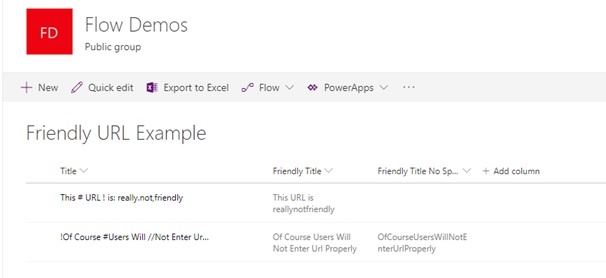
The previous step didn’t actually help us remove the spaces. So, let’s try another code to remove the spaces too:
Replace(replace(replace(replace(replace(replace(replace(replace(replace(replace(replace(replace(replace(replace(replace(replace(replace(replace(replace(replace(replace(replace(replace(replace(replace(replace(replace(triggerBody()?['Title'],':',''),'%',''),'#',''),'*',''),'<',''),'>',''),'?',''),'/',''),'"',''),'"',''),'@',''),'&',''),'=',''),'/',''),';',''),'|',''),'\',''),'[',''),']',''),'~',''),'{',''),'}',''),'^',''),'!',''),',',''),'.',''),' ','')
Here's the output for the above query:
Make sense? Awesome isn’t it? Give it a try and let us know your experience with Microsoft Flow and SharePoint!