.jpeg)
Social media platforms at work may sound counter intuitive to encourage employees to communicate through social channels at work but we’re not talking about any kind of ordinary social platform. We’re referring to communication channels on the best intranet solution through SharePoint and Office 365 such as Yammer for business chatter.
Microsoft defines Yammer as “a private social network for organizations and is built around open communication.” It works like most popular social media platforms your employees may have used before so it’s super easy to learn the intuitive design and adapt for most savvy Internet users for platforms such as Yammer, Skype for business and Microsoft Sway.
Use Yammer to Improve Employee Communication
Think of enterprise social networking as a one-stop-shop for questions and answers through posts and comments that are utilized for business goals. Yammer makes it simple for employees to communicate with team members they may not personally know within the organization but they can chime in with their knowledge and experience to help solve problems and answer questions. Ultimately increasing productivity by getting employees out of endless email chains. Yammer provides analytics to provide actionable insights into how employees are communicating in a style that isn’t possible through emails.
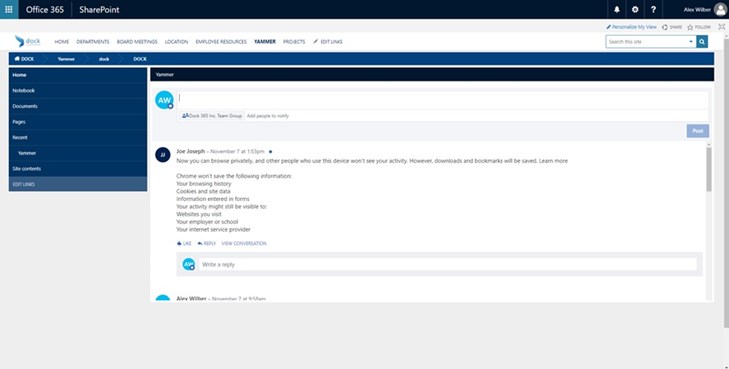
Yammer technology creates a platform for speedy communication, knowledge sharing and plays a key role in the digital workplace, especially for remote workers and businesses with teams on a global scale. We understand every business has unique needs and we can implement social communication that works best with your needs. Employees can use the Yammer web part for broad discussion scenarios as well as targeted responses to engage your viewers on the message and content on the page. For example, you could provide the platform to only those who work in the IT or Help Desk departments before launching company-wide platforms. We also recommend Yammer for collaborating with external partners and accommodating with an array of working options with customers, vendors and external business partners.

Skype for Business Video Conferencing Tool
Skype is a common video chat tool but it has a business side as well. Instant messaging is a fantastic way to send out a quick question or follow up before a meeting with one or more contacts in real-time. Granted, it’s less than formal than traditional email but it’s faster than a phone call or less intrusive than a text message on their personal mobile phone. We recommend adding the contacts on your team that you communicate with the most to your favorites list to double click to start a new chat dialog box. You can find people by name, email address and if they’re in your organization, you can find them by their phone number.
Getting Started with Microsoft Sway
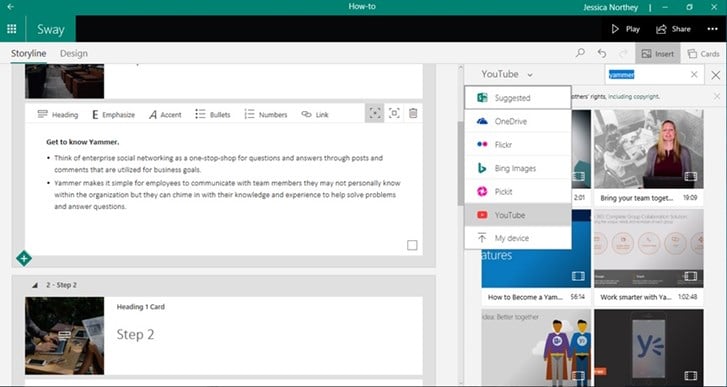
Sway is an app from Microsoft Office that makes it easy to create and share interactive reports, personal stories, presentations, and more. It’s like having a digital assistant of a new type of ready-to-go web canvases, uses assisted authoring and provides content aggregation. You can combine text, video, images and social media from other sources to create an interactive presentation. Yammer can be used from onboarding tools that allows HR professionals to teach a new skill or guide them through a new process completely remotely. Sway is also capable of allowing a viewer to navigate through the content solo versus the material being presented by another person.
No design skills are needed and it’s fully customizable so that your presentations don’t look like everyone else’s. Sway’s built-in design engine saves you time on formatting to ensure your creation will look professional. After you’ve added all your content, you can try out different themes or fully customize your layout to match your company’s branding. Once you’ve finished, share your creation with your team on any web browser with a link and choose who has access with privacy settings.