
Microsoft SharePoint essentially a collaborative platform is highly configurable, and its usage varies substantially between different industries. The platform offers a wide variety of customization options like:
- Full trust code execution on SharePoint servers
- Add-ins
- Sandboxed solutions
- Interface customizations
- Javascript/CSS embedding
Background
Having said that, in multi-tenant SharePoint Online, sandboxed code service has been deplored and adding to the chaos full trust code has never been supported. Customizations in SharePoint Online have been achieved through either remote-code execution, JavaScript embedding or add-ins. Even though JavaScript embedding has emerged to be a powerful way of extending SharePoint, the flip side is that it has been extremely difficult to keep up with the timeless model of SharePoint Online. This is where SharePoint Framework steps in by providing a standardized framework to build applications and create custom user interface extensions on top of SharePoint Online.
Advent of SharePoint Framework
SharePoint Framework has indeed been a harbinger of good times for developers and organizations trying to extend SharePoint capabilities to meet their specific business needs. And the latest version of the Framework makes it even more easier to achieve the same consistently across all sites in the tenant.
Exploring SharePoint Framework
- SharePoint Framework is the only development model that developers can use to extend modern SharePoint experiences.
- In case, your organization is planning to migrate to modern experiences or already transitioning, give your journey the extra mileage by building solutions using SharePoint Framework as it works well for both classic and modern SharePoint sites.
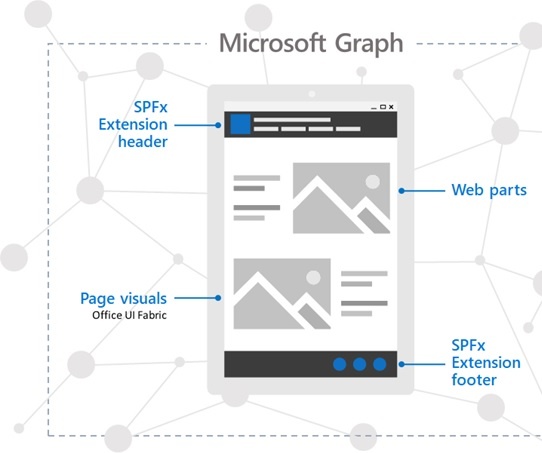
- Developers can now build client-side web parts and extensions using SharePoint Framework. This helps them to add new and improved functionality to SharePoint user interface in a future-proof way.
- With extensions, developers can now control how fields are rendered, add menu items to list toolbars or provide extra information in page header and footer.
New Tenant-wide deployment of SharePoint Framework extensions
Microsoft has added support for tenant-wide deployment of SharePoint Framework extensions in version 1.6 of the SharePoint Framework. This will provide developers the capability to decide if a solution should be deployed globally or not.
Steps
- Add the solution to the app catalog
- While doing so, developers can choose if the solution should be activated on specific sites or all sites across the organization
- Click Deploy
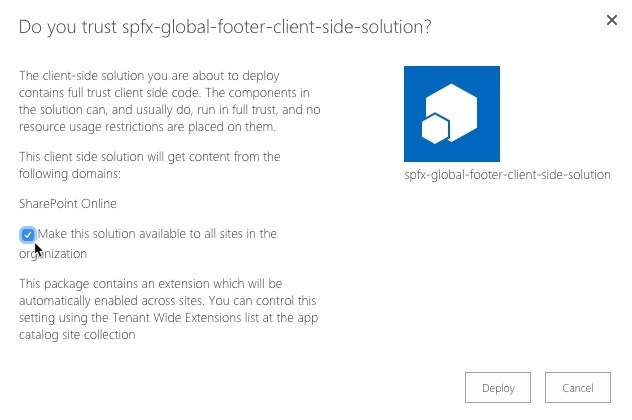
- Once the solution has been deployed, chosen extensions to be activated globally will be enabled on all sites
The Tenant-wide deployment is a great value-addition to the digital workplace that will not only help developers deliver solutions to end-users but also simplify deployment and maintenance.
Do you want to get more out of SharePoint or know how our SharePoint Intranet Portal can help your organization grow, get in touch with our team today!


.webp)