
How to Create a Lookup Column to another SharePoint Site?

Learn how to easily create a Lookup Column to another SharePoint Site in just a few steps. Read the blog now.

A lookup column is a referential integrity between the lists in SharePoint. It retrieves one or more values from a target list if those values match the value in the lookup column in the source list.

Advantages of Lookup Columns

You can easily create multiple relationships between lists without using any calculated fields.

How to create a SharePoint Lookup Column to another site?

Let's explore how to create a lookup column in a list/library that looks up data from a list/library of another site.Without further ado, let's get started.

  • Go to Site Contents > Site Settings

Site contents (1)

  • Click on Site Columns

Site Settings-1

  • Click on Create

Site Columns

  • Give the Site Column an appropriate name and choose "Lookup" as the type.
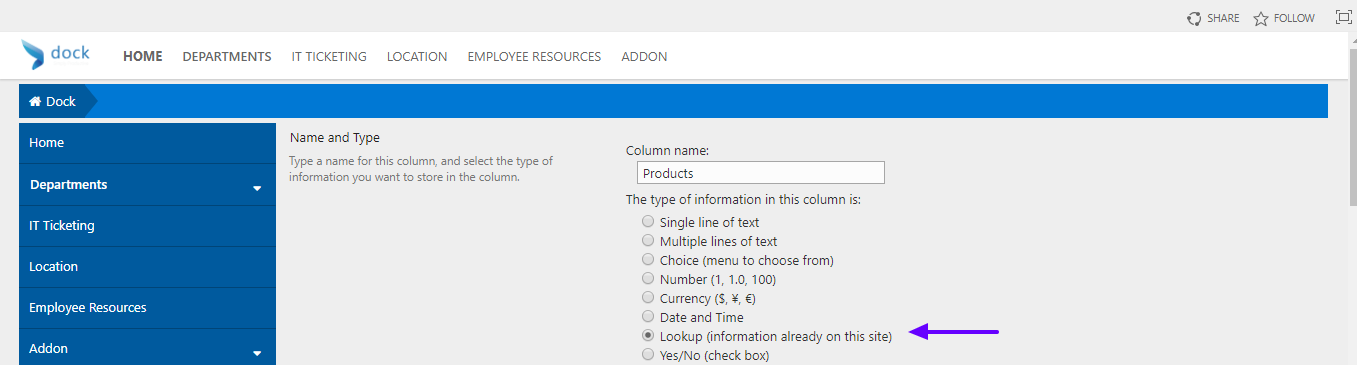
Create Column

  • Navigate to your Sub site and add your Site Column to any list/library
  • Go to Library Settings

Form Templates   All Forms

  • Click on Add from Existing Site Columns under the Columns section

Document Library Settings

  • The next step is to find and add your Site Column
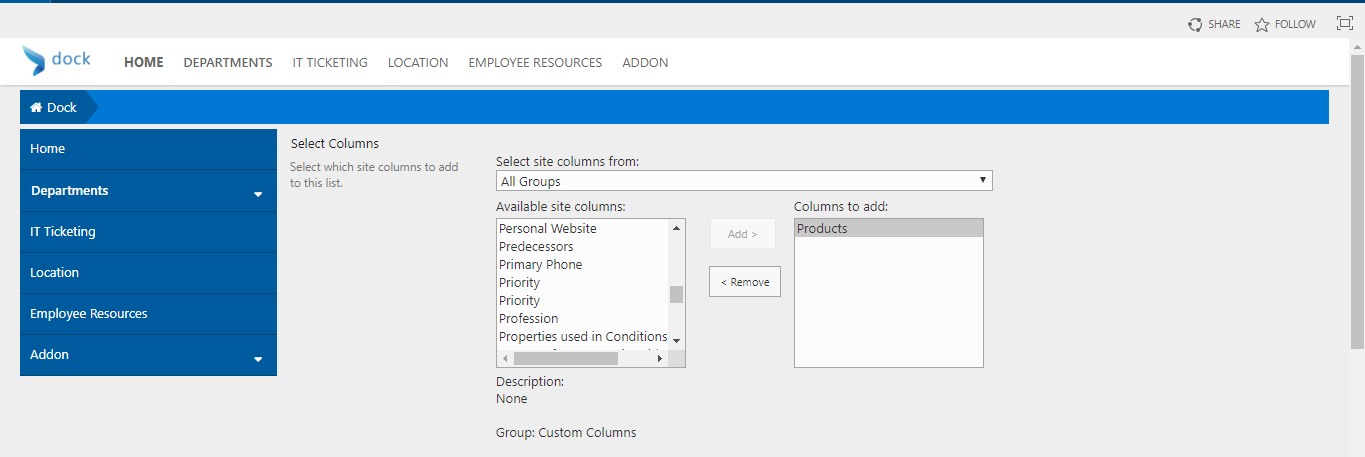
Add Columns from Site Columns

Viola! You have successfully created a SharePoint lookup column to another site.

Creating Hub Sites, Blog Sites, and Team Sites are also some popular queries our users frequently search for. We have done comprehensive blog posts to help them. Take a look at those posts if you find this blog post useful.
Have a nice day!


Table of contents

Read more blogs

See all

SharePoint & Microsoft 365 (Product Tips & How-Tos)

Permission Levels in SharePoint-An Overview

Discover what permission levels exist in SharePoint. Learn how to Plan your permission strategy

Read more

SharePoint & Microsoft 365 (Product Tips & How-Tos)

5 Lesser Known Benefits of a Modern Intranet Portal

A Modern intranet portal is packed with amazing features and facilities. Gain insight into 5 lesser known benefits of having a modern intranet portal here.

Read more

SharePoint & Microsoft 365 (Product Tips & How-Tos)

Transform Outlook into a Project Management Tool with One Note Part 2

Read our blog to know how to organize correctly and implement the OneNote integration to stay on top of your tasks using project management tools.

Read more

Less time on contracts, complete control over them.

Automate contract tracking and renewals, connect every agreement to its vendors, invoices, and projects, and get full visibility with enterprise-grade security built in.

Our contract process didn't fit neatly into the rigid workflows offered by many vendors.

Dock 365 was the last vendor I looked at, but it quickly became clear it was the right fit

Jennifer McGaffey

Legal Operations Manager, Short Elliott Hendrickson