
Microsoft Teams is here with all-new and exciting capabilities. This is has been an outcome of the extensive feedback gathering from users regarding their Teams experience. The same feedback has been utilized to continuously improve the Teams platform and admin capabilities. With the Teams platform, organizations now have the ability to customize and extend their experience.
Without further ado, let's explore the new capabilities.
Exploring New Microsoft Teams Administrator Roles
Now provide members of your admin team the access they need to excel at their job
Introducing four Team admin roles:
- Teams Service Administrator
The user with this role has access to all the controls available in the Microsoft Teams and Skype for Business admin center and their corresponding PowerShell equivalents. Diving deeper, the role provides a user the capability to manage all meetings, voice, messaging, and org-wide settings.
- Teams Communication Administrator
A Teams Communication Administrator has the capability to manage meetings and calling functionality in Microsoft Teams.He/she can bring changes to conference bridges and phone number assignments.
- Teams Communications Support Engineering
Users with this role can access advanced call analytics tools and view full call record information.
- Teams Communications Support Specialist
This role enables a user to access basic call analytics tools. He/she can view information for the specific users being searched for.
PS. For each role, PowerShell cmdlets are available. You can find most of these in the Skype for Business PowerShell module.
How to assign users the Teams admin roles?
You can assign any of the above-mentioned Teams admin roles to users using the Azure Admin Portal.
- Find the user profile in the Azure Active Directory
- Click on “Directory Role” from the left navigation
- Click “Add Role”
- Select the Teams admin role you want to assign
- Finally, assign the new Microsoft Teams admin roles

Manage teams directly from the Admin Center
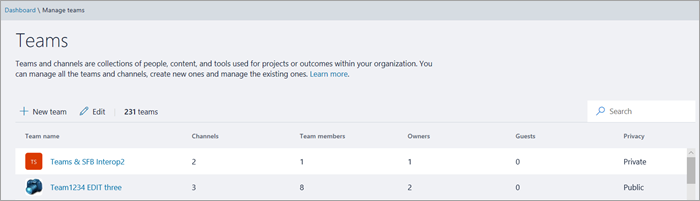
Foster communication and collaboration with the new capability to manage the complete list of all teams in your organization from the Microsoft Teams and Skype for Business Admin center (or via PowerShell).
To access the list in the admin center
- Select Teams in the left navigation
- Click "Manage Teams"
With this view, Global Administrators or Teams Service Administrators can access team properties like team name, number of users, and privacy information. In addition, owing to the search and edit capabilities, you can easily find a specific team and also perform key actions like transfer ownership, updating membership and changing settings.
Automate the Teams Lifecycle
Do more with the the general availability of 37 Graph APIs.
Leverage the new Microsoft Graph APIs to automate different tasks including
- Deployment of apps in team and channels
- Provisioning of large groups of Teams
- Automatically creating teams and channels (with business-specific limitations)
Whenever a new business issue crops up, you can create a new virtual team leveraging Microsoft Graph APIs. It not only allows you to create a new team but also populate the team with the right people, and configure the team with channels and apps.
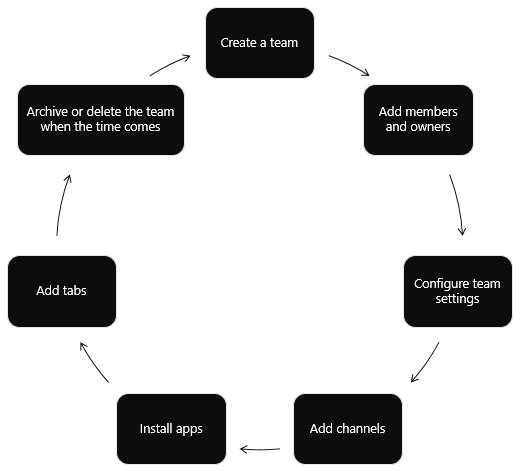
Once the issue is resolved, you can archive or delete the team using Microsoft Teams API. Further, if you already know the maximum duration the virtual team will be required, you can set an Office 365 group expiration policy that will automatically remove the team as per the policy.
Powered by Microsoft SharePoint & Office 365,Dock is a clean intranet portal with communication and collaboration at its core. The platform ensures seamless collaboration, enhanced employee engagement and productivity.
Schedule a Free Demo Now

.webp)