With technology and its different manifestations pervading our workplaces and personal spaces, reminders have emerged to be an integral part of our social fabric and personal lives. Right from Facebook's birthday reminders to the task reminders in Outlook, reminders have become a part of our day-to-day response mechanisms.
Undoubtedly, individual productivity is a big contributor to the entire team's productivity. And daily reminders are the reflection of an individual's productivity and attitude. Now even SharePoint has joined the bandwagon by releasing a new capability that lets you set reminders. Once the reminder is set,you will receive a personal email alert ‘x’ days prior to the date on any document or item in SharePoint.
How to create a reminder flow ?
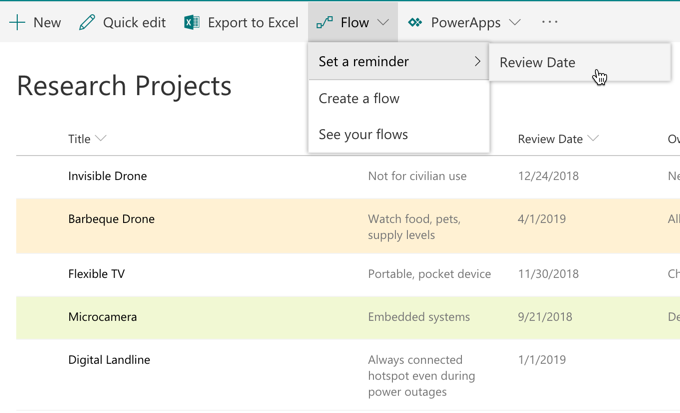
There is one prerequisite when it comes to creating reminder flow. The list or library should contain at least one date/time column in the current view. Thereafter, select Flow ⇒Set a reminder menu to create a reminder.
Users can choose the number of days before which they want to be reminded about an important meeting/call or any other task that needs to be completed.
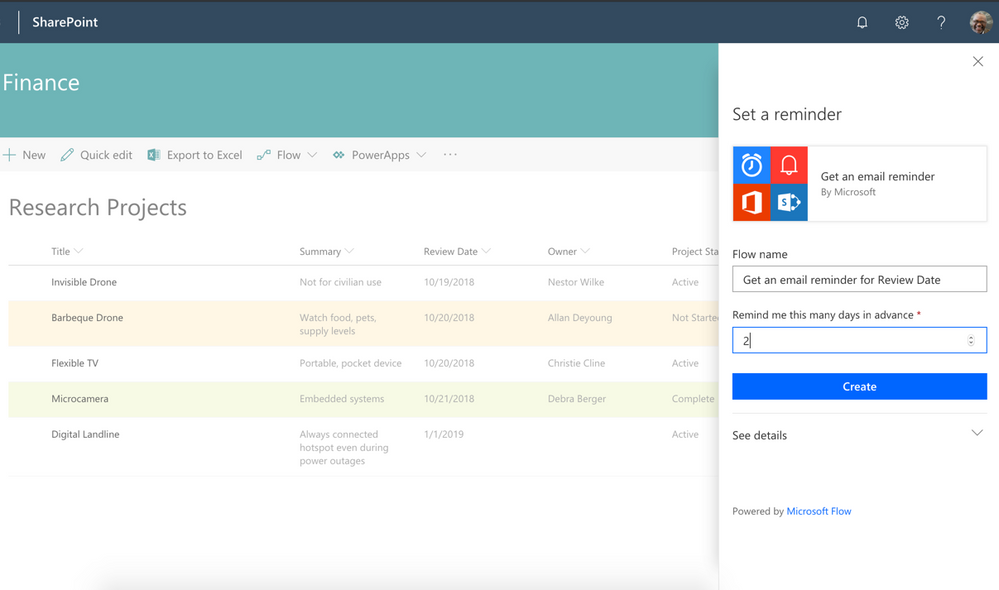
Depending on your selection. you will receive an email from Microsoft Flow ‘x’ days prior to the
selected data column value.

You can easily edit the flow from the Microsoft Flow website. In addition, you can add additional actions or modify the days in advance.
Dock is a pre-built intranet portal for your organization. Powered by Microsoft SharePoint & Office 365, it is a clean corporate intranet software, which is perfect for enterprise level solutions. Get ready for Dock.
Schedule a no-obligation Demo!