
Task management is great when your colleagues have access to the entire information available in a single place.
An obvious question from different users is that why not use SharePoint Task Web Part instead of Microsoft Planner. Watch the below video to learn more:
Watch Video: Microsoft Planner vs SharePoint Task Web Part
So, what’s the good news? Microsoft Planner can be integrated with Microsoft 365 solutions like Microsoft Teams, Microsoft Outlook (Calendars) and Microsoft SharePoint (Files/Document Management). The SharePoint integration has come out well with exciting features where you can actually embed Planner to your SharePoint sites! I’ll try to come up with a video on how to embed Planner to your SharePoint Sites.
What is Microsoft Planner?
Microsoft Planner is a solution that comes with your Office 365 Suite. You can launch the Planner app right from the Office 365 launcher button. This will help users to create new plans, assign tasks, build a team and update statuses.
By setting up different boards, you can create tasks and assign to categories which is known as buckets. Based on the task status or assignees, you can categorize tasks accordingly. To change statuses or assign different users, all you need to do is drag and drop the tasks! I’m sure you will love this!
What’s the benefit for SharePoint?
The capabilities of task management brought directly with the SharePoint Team Sites are:
- Adding a Plan
- Adding a Web Part.
Adding a Plan
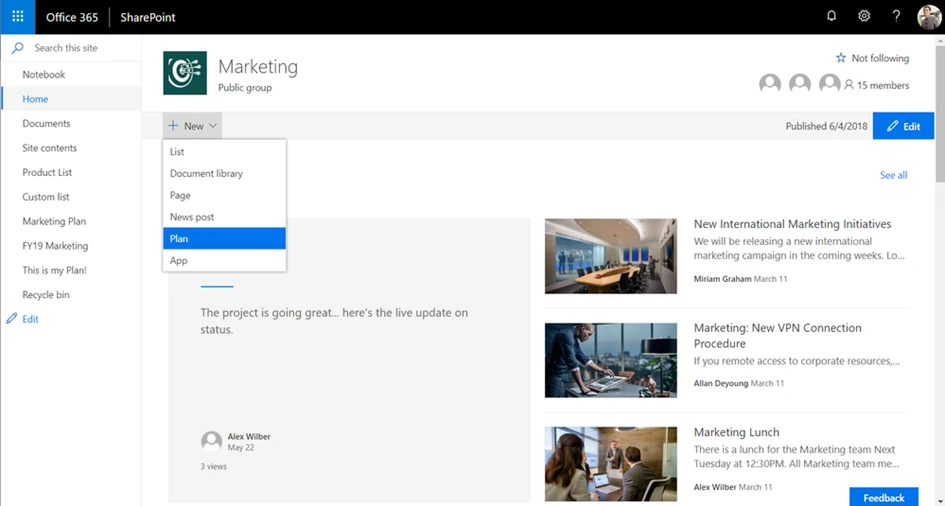
When you click on the New button (Modern View) of the SharePoint Site, you can now create lists, document libraries directly from your homepage. Same goes for adding a new Planner plan too! Add the Plan to your navigation pane so your employees can access it with a single click! Easy, isn’t it?
Adding a Web Part
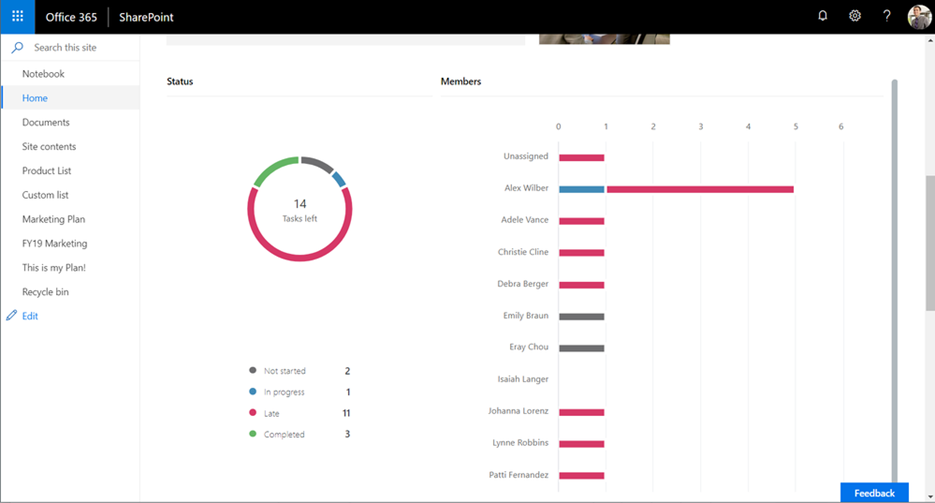
The Microsoft SharePoint Web Parts assists you to access important information right from the shared documents to internal news. The latest Planner Web Part allows users to add plans directly on to the news posts and pages. It depends on what task description is important for your team; choose between Planner Charts or Boards to setup onto your homepage.
.webp)