
As announced by Microsoft on July 24, 2018, Power BI Management cmdlets are now available in Azure Cloud Shell, all thanks to the full support for .NET Core. Say no to frustrating version mismatches, PowerShell configuration issues or even assembly conflicts such as “Could not autoload matching module” or “Could not load file or assembly” with new functionality. Just head over to Azure Cloud Shell and run commands directly in the Azure data center where your Power BI tenant is hosted. The update is a great news for users who quickly want to get started without installing additional PowerShell modules locally.
PS. An Azure AD instance is provided with Power BI. Thus, you can log in to Azure Cloud Shell using the Power BI account.
Getting started
- Go to portal.azure to launch Azure Cloud Shell
- Sign in with your user account
- Alternatively, in the Azure Portal click on shell button in the upper toolbar to launch Azure Cloud
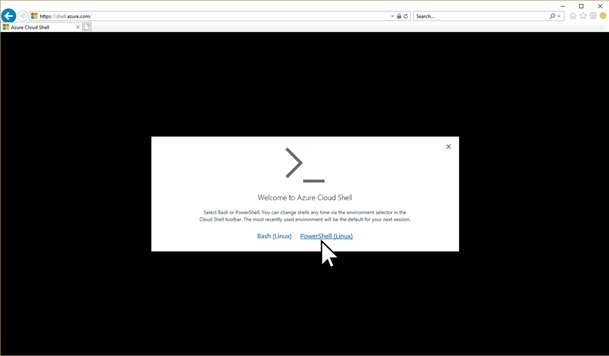
- As depicted in the image below, you may be prompted by Azure Cloud to choose between Bash and PowerShell. Make sure that you click “PowerShell (Linux)”.
- If necessary, Azure Cloud Shell will prompt for an Azure subscription and a storage account as it requires a subscription and a storage account. It comes with a nominal price. Check Azure Pricing Calculator to know more.
- Trial and pay-as-you-go options are also available
- Azure Cloud Shell will not work without these resources
- In that case, to access functionality you must update the .NET Framework and PowerShell on your workstation and uninstall any modules that might conflict with the Power BI cmdlets.
- When Azure Cloud Shell is an option, you can use Power BI cmdlets without installing any additional modules.
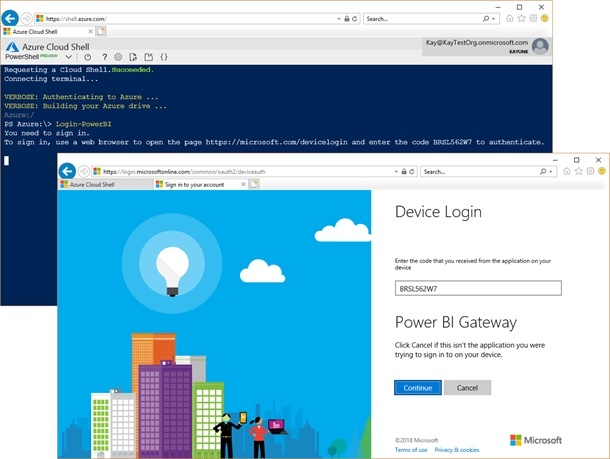
- Just type Login-PowerBIand follow the instructions
- Click “Continue” to complete the login process
PS.As of now the application identifies itself as Power BI Gateway. This is confusing and will be taken care of in the future.
- Ta-da! You can now use the Power BI cmdlets in the cloud shell exactly like you were running them on your local workstation.
To know more about Power BI cmdlet or our SharePoint Intranet Portal Software, get in touch with our experts. Transform your business with Dock 365.
Click below to schedule a free demo today!