
Power BI has helped organizations in leaps and bounds when it comes to power business intelligence and deriving crucial insights from data within minutes. It allows you to transform data and create reports and visuals that can be published across web and mobile devices.
Is Power BI an integral part of your digital workplace? If yes, the you are in for some good news! Microsoft Power BI now offers enhanced filtering capabilities. As illustrated in the screenshot below, you can now define more complex report-level filters directly in report URL as query string parameters.
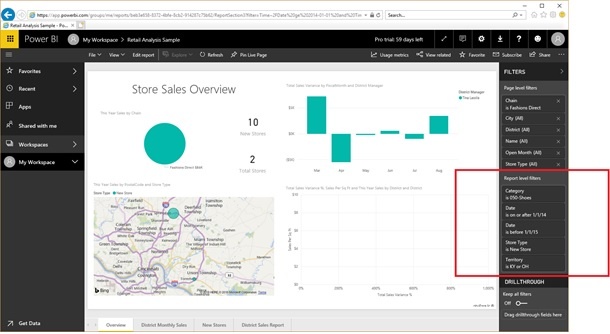
As depicted in the image below a report level filter in a retail analysis sample ensures that only results for
- Item category “050-Shoes”
- Year 2014 (the last year with data in this sample solution)
- New stores in Kentucky and Ohio
are displayed. The applied report-level filter can be seen in the Filters pane.
?filter=Time/Date ge 2014-01-01 and Time/Date lt 2015-01-01 and Store/Store_x0020_Type eq 'New Store' and Item/Category eq '050-Shoes' and Store/Territory in ('KY', 'OH')
Above query string defines this filter definition. It depicts that users can filter different data types, multiple fields and escape column names that have special characters. Sequence _x0020_ is used to specify the column name “Store Type” in OData-compliant syntax. Further, in operator is used to narrow down the sales territory.
With an aim to be consistent with the filtering methods in other Power BI areas, Power BI Report URL filters follow the OData syntax.
PS.Not all OData filter capabilities are supported in Report URL filters.New Capabilities with Report URL filters
- Create shortcuts to pre-filtered reports
- Gain quick and easy access to the data you care about most with easy to create desktop shortcuts
- Add the URLs to the Favorites list of your Web browser
- View filtered report directly from a tile by using custom URLs with dashboard tiles
- Create a table in a Power BI solution using desired report URLs
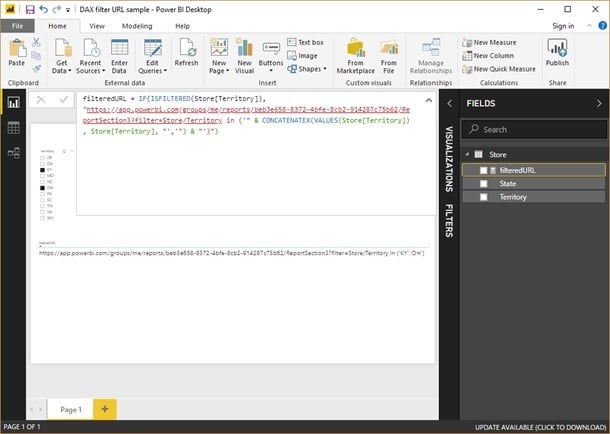
Using a DAX expression, a filter URL can be dynamically constructed in a Power BI solution as shown in the above screenshot.
Once the DAX expression checks using a slicer if the user has applied a filter on the Store/Territory column, it generates filter URL using the available values.The above example illustrates the enormous possibilities to dynamically generate filtered report URLs.
To know more about Power BI or how Dock 365 can help your organization thrive-get in touch with our experts or schedule a Free Demo today!


.webp)