
A lot of our prospects have been asking, “Why should we go with Office 365 instead of G Suite?” Some of our clients from the Far East went with Office 365 because they didn’t have the choice. It is obvious that users are having ambiguity in choosing the right solution for their business. Both provide similar solutions such as text editor, emails, storage and much more.
In this blog, I intend to draw a comparison between Office 365 and G Suite:
#1. Offline Accessibility
Yes, this one of the reason why users prefer to go with O365 as you can avail the desktop versions of Microsoft Word, Excel, PowerPoint etc.
For instance, you have documents stored on your SharePoint/Office 365 with Microsoft Word installed in your system. This way, you can protect your data if your system has crashed or lost.
#2. Apps
There’s not much comparison you can make between Office 365 and G Suite. Both of them takes advantage of the Cloud. The most important feature is the Co-Authoring Feature which was introduced by G Suite first and now, Office 365 has the similar feature for both Microsoft Word and Microsoft Excel.
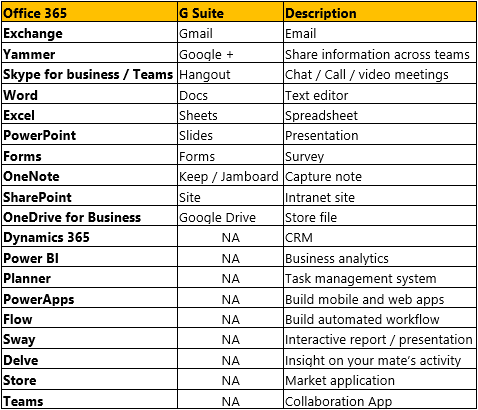
Let’s compare the features of these two platforms:
#3. Pricing
G Suite Licenses has 3 plans:
- Basic version - $5/user/month
- Business version - $10/user/month
- Enterprise version - $25/user/month
Click to learn more about the pricing.
Office 365 is fairly complicated and has different versions/plans for the below categories:
- Small Business (For less than 300 Users)
- Enterprise (For Over 300 Users – E1, E2, E3, E4 Plans etc.)
- Education (Which is provided as a donation for qualified institutions)
- Government (They have the privilege to attain a discount for the subscription)
- Non-Profits (Which is provided as a donation for qualified non-profit organizations)
- Home Users and
- First line workers.
You can find plans such as Office 365 Business, Premium and Business Essentials that can be signed up for annual commitment.
Click here to learn more about the Office 365 Plans.
#4. Emails
If you compare O365 Packages with G Suite, Microsoft offers better storage as it gives out 50 GB per mailbox with 1 TB of storage. In the case of Google, it offers only 30 GB. But, G Suite Business doesn’t have storage limit for its mailboxes compared to Office 365 where the best you can attain is 100 GB.
Both Office 365 and G Suite provide desktop version of email applications. Outlook’s desktop version isn’t available with every license.
Verdict
According to us, users who are confined to file share and emails only can rely on G Suite. To have a complete collaboration experience, there is no doubt that Microsoft is the champion. You never know how fast your business grows. To prepare yourself for the change, it is advised to go with Office 365 as it offers most of the features that can benefit your organization. Microsoft Partners are available to serve you with custom requirements but with G Suite, you cannot.