I’m sure you have been reading a lot about Modern Experience in SharePoint lately. We're excited as we're developing our Next Gen solutions called Dock Modern Enterprise and Dock Modern Lite.
Why is everyone talking about the Modern Experience? It’s simply because it’s the future and the user experience is going to be even better than before. We decided to bring another blog series for SharePoint Modern Experience!
So how do we make use of the modern lists and libraries with the powerful capabilities?
- Being organized and working effectively with metadata.
- Customizing modern pages and lists using SPFX Extensions.
- Working easily with larger lists.
- Configuring the look and feel of columns with declarative column format.
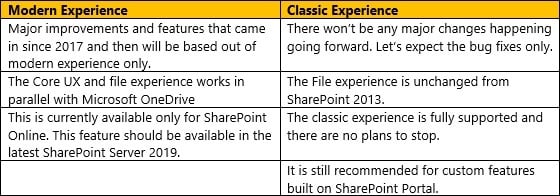
- Staying in control with modern and classic experience in parallel.
Let’s take up the core areas and discuss about it in detail:
Lists
Extending user experience of SharePoint
You can now leverage the native SharePoint Framework tools and libraries for your customers.
- Application Customizer: Adding scripts to modern experience pages and extending well-known HTML placeholders with customized renderings.
- Field Customizer: Customizing the data inside columns that are rendered in the list view.
- Command Set: Extending modern list command surface with latest features which run customized code when evoked.
Metadata
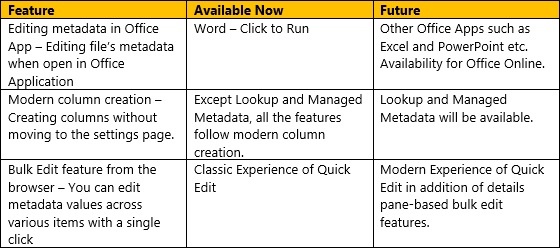
Metadata is intended for productivity and organization. It’s never considered as a roadblock. It’s much easier than before for configuring libraries with custom metadata and then working with that metadata.
- Modern fundamentals: Easier for adding and changing columns, filtering items, saving views, and editing via browser.
- Custom Formats: Changing how the fields appearance using declarative, new, JSON-based configuration tool.
- Attention Views: Letting your users known what files in the libraries require attention and making sure that it is completed quickly whenever required.
Metadata – Fundamentals
Well that’s it for today. We’ll be coming up with more series of this blog in coming days.

.webp)