
Office 365 and SharePoint Online serve a wide spectrum of customers with diverse usability and security needs. There are customers who don't mind numerous authentication prompts if it ultimately means their data will be secure on the other hand there are other customers who despise the sight of a login prompt.
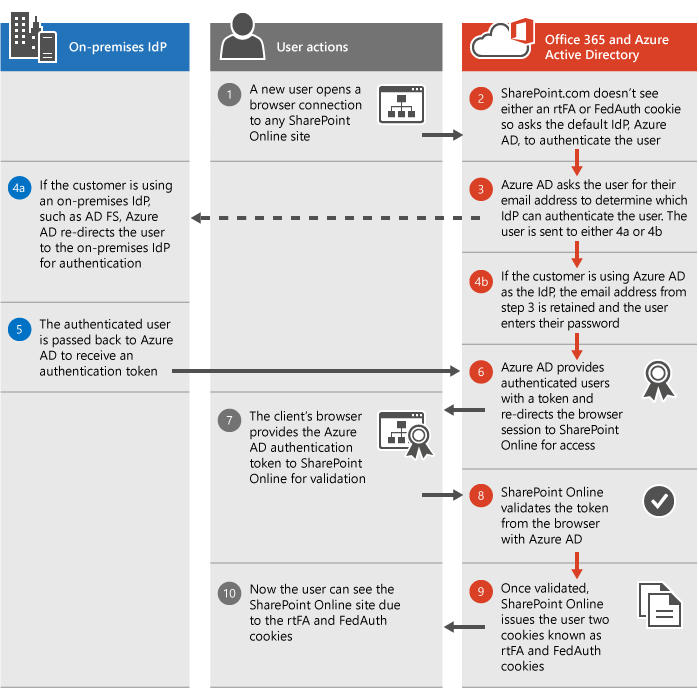
With platforms like SharePoint, customers don't have to choose between usability and security as these work together in a great way. The below depicted image showcases the SharePoint Online authentication process and how it works using either your own Identity Provider (IdP) or the default Azure Active Directory (Azure AD) IdP.
- For each top-level site in SharePoint Online including root site, the MySite, and the Admin site the Federation Authentication (FedAuth) cookie is used.
- Across all of SharePoint Online, the root Federation Authentication (rtFA) cookie is used.
- The rtFA cookie is used to authenticate a user silently without a prompt when he/she visits a new top-level site or another company's page. When a user signs out of SharePoint Online, the rtFA cookie is deleted.
Session and persistent cookies
- By default, all SharePoint Online cookies are session cookies. Once the browser is closed, the cookies are deleted instead of being saved to the browser's cookie cache.
- Office 365 enables persistent cookies once a user clicks the Keep Me Signed In button during login provided by Azure AD. These cookies are saved to the browser's cache and will persist even if the browser is closed or the computer is restarted.
- With persistent cookies, the number of authentication prompts users see reduce and this has a huge impact on the sign-in experience.
- Some SharePoint Online features, such as Open with Explorer and Mapped Drives require Persistent cookies.