
When speaking to our customers, we tend to debate as to whether SharePoint OOB (Out of the Box) is an intranet portal or not. We admit that Microsoft products release excellent enhanced features, responsiveness, and publishing experiences in the latest SharePoint instance. However, we recommend to our customers on the importance of choosing SharePoint based intranet portals like Dock for their organizations. You may be surprised by what you learn.

You might be asking yourself why growing companies choose SharePoint based intranet portals. Simple, to significantly and easily enhance their collaboration and communication.
The Intranet Defined by Microsoft
Per Microsoft, an intranet portal refers to a set of SharePoint sites where the users in an organization can collaborate and share information. Even though Microsoft has come up with its latest communication site experiences, companies are demanding for more features for their company intranet.
Today’s organizations are diligently looking for centralized communication platforms, especially for employees who are always on-the-go. They desire interfaces that can help to achieve their tasks and get notified with business-critical information to save time and money. Dock is the answer to solving these issues.
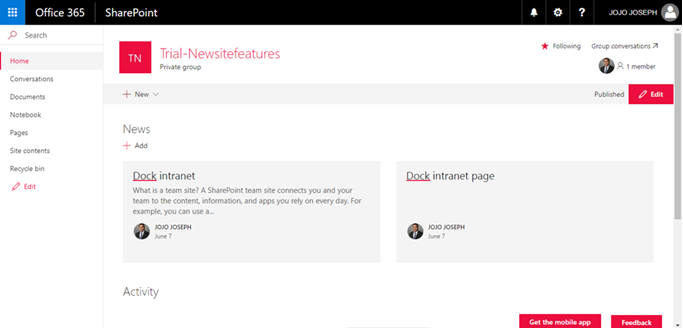
SharePoint Out of the Box
Dock Enhances Standard SharePoint and Productivity
The major complaint with a standard SharePoint is how it doesn’t allow you to focus on targeted content to the required subset of employees. In addition, the capability for global navigation across the multiple areas/sites are missing. As well as lacking the data driven aspect that’s mandatory for employees, as they should be able to search for what they are looking for inside the intranet portal.
This is where a customized SharePoint intranet portal will solve these issues. When choosing an intranet portal, be sure to choose one that will work well in the long run. Look for an experienced SharePoint Specialist versus buying a cheap product and replacing it a year or two later.
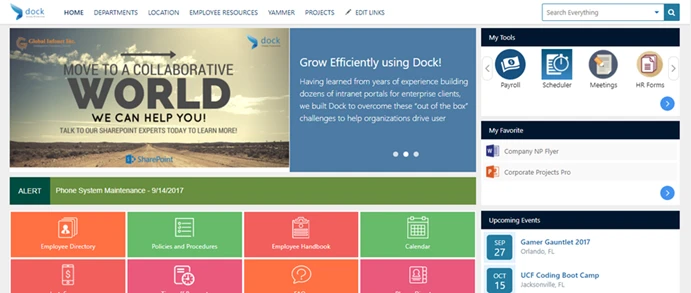
Dock Intranet Portal powered by Microsoft SharePoint
The Need for Customization in SharePoint with Dock
Because SharePoint OOB is time consuming to learn and requires technical resources to customize needs, we’ve created the answer to solve many of your challenges. Looking back, SharePoint intranet portals always required custom builds. Dock intranet portal comes with pre-loaded modules to make up for the fact that SharePoint OOB doesn’t offer the critical required features to increase productivity effectively.
Customized SharePoint Intranet Solutions
So, why are customized SharePoint intranets not recommended to an extent? For starters, the chances of losing your customizations when upgraded to latest SharePoint versions are high. Businesses need to redevelop those features again, which is time-consuming and costly. The latest features released by Microsoft could tamper with existing customized apps or workflows.
When considering a custom SharePoint intranet portal, it is recommended to see if the desired solution supports the current SharePoint version first. Try to find out how many times the latest updates have ruined the functionalities of the intranet solution prior to deciding to make purchase. Many businesses have been known to get into situations with similar pitfalls of a custom intranet portal issues.
Solution? We recommend businesses look for multi-talented SharePoint Experts (Like us!) for maintenance and development.
About Dock
Dock is a true collaboration platform that brings together the superior productivity and organizational features of Microsoft SharePoint. Dock is an easily customizable and branded intranet platform so your teams can achieve their goals efficiently.