
We have been helping our customers with Office 365 external sharing that provides them with access to SharePoint Online, OneDrive for Business, Unified Groups and more. Azure Active Directory B2B collaboration is just like this functionality. All external sharing (excluding SharePoint Online and OneDrive for Business), including Office 365 Groups guests uses Azure Active Directory B2B collaboration invitation APIs for shares. Still didn’t get what Azure Active Directory B2B collaboration means? Read further:
Azure Active Directory B2B Collaboration
The Azure AD B2B collaboration features helps organizations that use Azure AD to work securely with their users from external organizations (irrespective or large or small). These companies won’t be having an Azure Active Directory or not even an IT department too!
The companies who use Azure Active Directory provides access to applications, documents and resources to their third-party companies maintaining the entire control over their corporate information. The IT can use Azure Active Directory B2B APIs to configure applications which allows 2 companies join securely. The end users also find it easy to navigate too.
Benefits of using Azure Active Directory B2B collaboration
Collaborate with users from 3rd Party companies
- 3rd Party companies need not use Azure Active Directory
- 3rd Party companies can use their own credentials
- No requirement for complex setups or external directories.
Easy collaboration
- Top-notch security for information and applications
- Organizations can allow access to any corporate data or applications when applying Azure Active Directory enhanced authorization policies
No Overheads
- External administrative overheads eliminated
- External accounts/password management not required
- No manual account management or sync required
How does Azure AD B2B differ from external sharing in SharePoint Online?
Well, Microsoft SharePoint Online has a different invitation manager. As mentioned in the beginning, we already had external sharing enabled in SharePoint Online before Azure Active Directory B2B collaboration. Later, the SharePoint Online external sharing came up with additional feature where millions of users followed this feature for their sharing needs. There’s quite number of differences between both SharePoint Online external sharing and Azure Active Directory B2B collaboration. Let’s check out the differences of the above two solutions below:
- If you are to compare the redemption experience in SharePoint Online, its way different from the Azure Active Directory B2B collaboration experience. Once a user redeems the invite, the experience looks the same.
- Licensing needs are different. For every Azure Active Directory paid license, you are entitled to add 5 guest users to gain access to paid Azure Active Directory features.
- The SharePoint Online external sharing feature works when the users have redeemed their invites to get themselves added to the user directory. Before redemption, you won’t be able to see users in Azure Active Directory portal. Meantime, if some other site invites the user, another invite is created. In the case of Azure Active Directory B2B collaboration, users are added immediately on invitation and populated across the site.
- Users that were invited using Azure Active Directory B2B collaboration can be selected from SharePoint Online sharing dialog boxes. The users invited via SharePoint Online shows up in Azure Active Directory after successful invite acceptance.
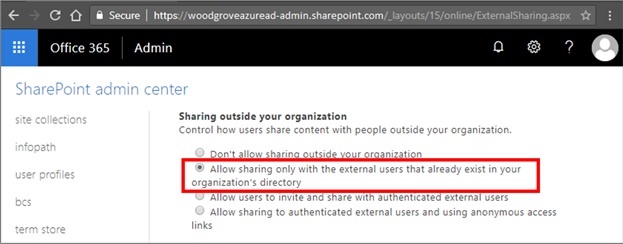
For managing external sharing capabilities on SharePoint Online along with Azure Active Directory B2B collaboration, you need to setup SharePoint Online external sharing settings to Allow sharing only with the external users that already exist in your organization's directory as shown in the image below. Users will be able to access externally shared sites and select external collaborators which admin has added. Administrators has the privilege to add external collaborators via B2B collaboration
.webp)