
Information architecture is an integral component when it comes to ensuring optimum maintenance and performance of a portal. Good planning is a prerequisite to building an optimal structure.
What is SharePoint Information Architecture?
The official definition of SharePoint Information Architecture is “the art and science of organizing and labeling the content (documents, data, and sites) to support findability and usability”. Despite having a good plan, information architecture is not a one-time process, rather, it a continuous process. When it comes to SharePoint, a poorly defined information architecture can result in serious problems like information silos and frustrated employees.
The key to building the right Information Architecture is planning well right from the beginning. Keep measuring, keep improving, and keep it relevant.

With the modern experience in SharePoint, it has become much easier and faster to evolve the structure and navigation. All this is possible because of the high flexibility achieved with the new, flat structure of Hub sites.
.
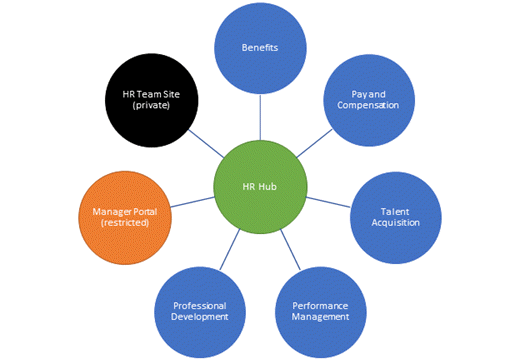
Hub sites
In stark contrast to the inflexible hierarchical system of site collections and sub-sites in classic SharePoint architecture, the modern SharePoint experience is far more flexible and adaptive to changing business needs. In the modern experience, every site is a site collection, and all can be associated with a hub site. A hub site is a flat structure of sites that share branding, navigation, and other elements.
Navigation
An effective website or SharePoint site should help a visitor find the information they need quickly. The fundamental principles of site and page navigation are equally applicable to both classic and modern SharePoint architectures. However, implementing navigation depends on the framework of sites and intranet. Talking about the modern experience, hub sites provide a great way to achieve the cross-site navigation features previously available in site hierarchies in classic SharePoint and managed navigation.
Powered by Office 365 and SharePoint, Dock ensures seamless collaboration no matter whether your employees are separated by a few cubicles or a few thousand miles. It is not just a secure intranet platform for your organization but a platform that enables your employees to innovate, discover, organize, collaborate, communicate and connect effectively anywhere at any time on a device of their choice.
Schedule a Free Demo Now!