
Welcome back to my SharePoint Modern Pages Series! Have you checked out my previous blogs yet? If not, here’s the links to get started:
Welcome back to my SharePoint Modern Pages Series! Have you checked out my previous blogs yet? If not, here’s the links to get started:- Series: Learn About the Latest SharePoint Modern Pages
- Series: Top Reasons for using SharePoint Modern Pages
Okay, let’s move on to the rest of the reasons for using SharePoint Modern Pages:
#1. Security: The classic SharePoint portals runs any JavaScript you want (There are webparts built for that need too – For e.g. Content Editor and Script Editor Webparts). It looks fine, but today’s world, you cannot be too careful about this.
The Modern SharePoint Sites are more protected than the classic SharePoint. You can bring in restrictions to the scripts on any website. You won’t be able to drop a script on a page by default. The IT team can set it up, but others cannot add arbitrary scripts to pages.
#2. Configuration: It is easy to configure. Few classic webparts was easier to deal with, but others needed arcane knowledge of display templates, XSL style sheets and other web technology. With the latest webparts, it is much easier to setup and doesn’t require any advanced technical knowledge to work.
What about the SharePoint Modern Pages? It is very easy to setup compared to Classic SharePoint. The main reason is the chances of the older UI refusing to cooperate with changes/upgrades.
#3. List & Library Enhancements: The Modern Pages has come up with a lot of improvements that includes conditional formatting, easy filters and attention views. The most important mention is about Modern lists addressing the 5000-item view limit issue that has been a talk amongst our customers for years. It isn’t a full-fledged solution; however, it eradicates the perennial pain point.
Also, the forms and workflows build on top of libraries/lists is modernized too. Thanks to Microsoft PowerApps, slowly replacing the built-in workflow options of legacy InfoPath form designer and Microsoft Flow. What’s the advantage? They aren’t confined within SharePoint and works with most of the cloud series both within O365 and beyond.
Now for the existing clients who are using InfoPath and SharePoint workflow, don’t worry! InfoPath and SharePoint workflow features won’t disappear anytime soon. They have their own limitation and you need to live with that at this point.
#4. The Future: Microsoft haven’t mentioned about removing the classic experience soon, but you need to be prepared for that. It is advisable not to work on any custom requirements with Classic View or you will end up redoing the requirement later. If you have plans on building a webpart, better work on it in the modern view so you can take advantage of the future Microsoft upgrades!
#5. Exposing latest features: If you haven’t noticed all the features that works on Modern Pages, check out the information below:
- News feeds that distributes links to pages automatically across the hub sites and to SharePoint mobile application.
- Site labels and classification: Easier for users to see when they are present on a site which has got sensitive data and they can easily label contents for compliance needs.
- Latest webparts: There are plenty of interesting webparts that works only on Modern Site Pages. Try googling this information online and you can get into lot of blogs to find out more about these webparts. The only webpart that works on both classic and modern view are custom apps developed like SharePoint Intranet Partners (like us!) for the latest SharePoint framework. The developers can target for both classic and modern pages with a single code base.
#6. Microsoft Teams: A lot has changed since its launch in 2017. Microsoft Teams is a perfect collaboration feature that’s centered on chats. Microsoft Teams facilitates integration of all Office 365 features under one roof (Planner, Tasks, Calendar etc.). So, which one’s better? Microsoft SharePoint or Microsoft Teams?
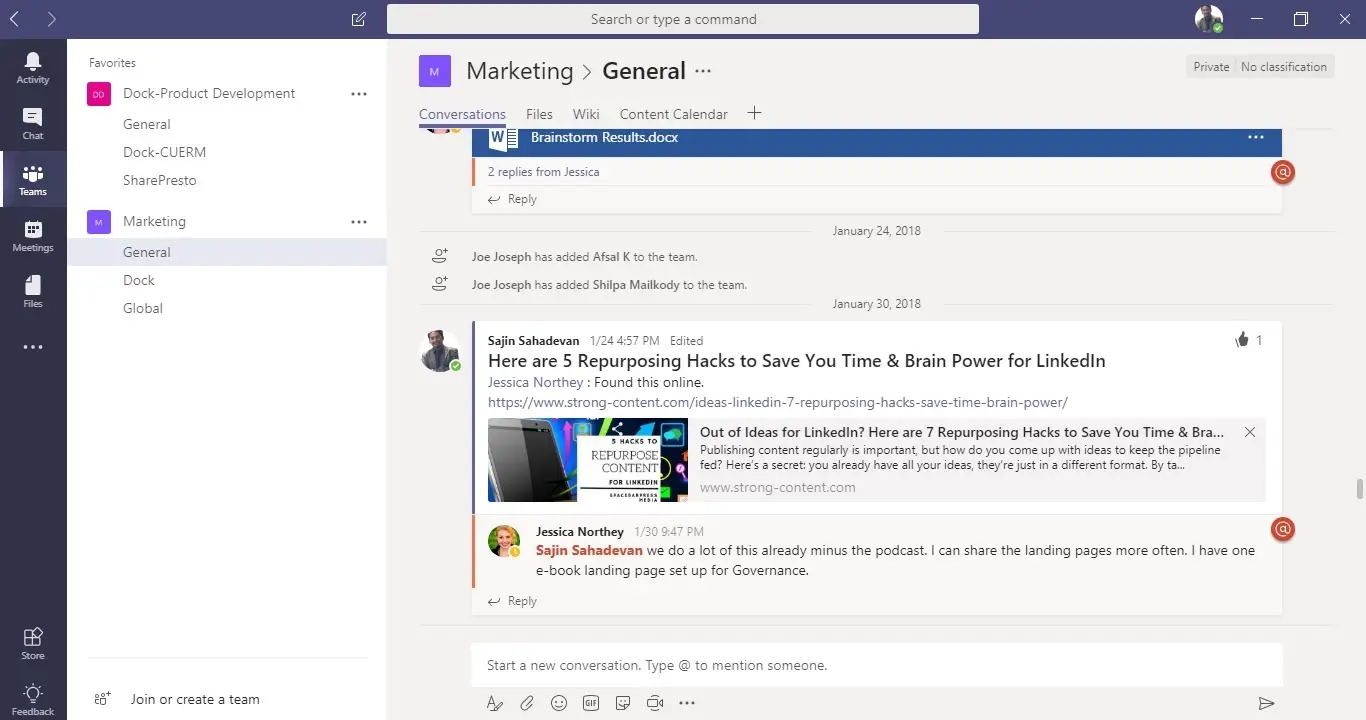
Well, this question itself is based on a major misconception. Are you aware of Microsoft Teams having a SharePoint team site and a group can be added to a Modern SharePoint Team Site? So, these 2 products aren’t competitive but converging!
While using teams, the users can go to the Files tab and click “View in SharePoint”. This will redirect the link to the browser -> SharePoint Site. Copy paste this link from the address bar and Add a tab on Teams with this link! Tadaa! You just got your SharePoint Site in Teams. We have been using these features within Teams, so our Projects and Sales Team finds it handy to retrieve information using the Microsoft Teams mobile application.
This comes to an end to the top reasons for using SharePoint Modern Pages. I will be back with the cons of using SharePoint Modern Pages in the next series. Stay tuned.