
Hello everyone! Welcome to the final part of the SharePoint Server 2016 vs. SharePoint Server 2019 Public Preview Blog Series!
If you haven’t read our Part I and Part II of the series, please check them out below:
- SP Server 2016 vs SP Server 2019 Public Preview – Part I
- SP Server 2016 vs SP Server 2019 Public Preview – Part II
In this blog, we would like to cite the differences between classic pages and modern pages, webparts, how to move to Modern Pages and about Microsoft Flow.
Classic vs. SharePoint Modern Pages
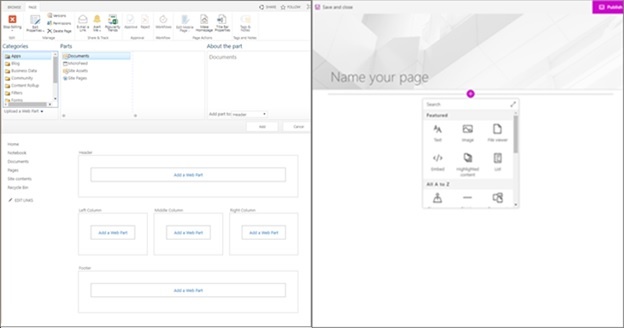
SharePoint Classic web part page is on the left, SharePoint modern page with webparts on the right
Webparts
Well, SharePoint Modern sites use the modern webparts for its pages. You can see the difference for yourself while browsing the classic pages and modern pages. Compared to classic pages, Modern webparts are built in such a way that users find it user friendly when deployed. It’s not only about the usability, but the page performance is great. There’s not a need for coding for deploying modern webparts. However, due to security reasons, one cannot insert codes like Jscript to the modern webparts. Please note that classic webparts are not compatible with modern pages and modern webparts cannot be used in your existing SharePoint classic pages. This could be possible if the UX designer creates a custom webpart to make it functional. Also, all the current modern webparts won’t be available in SharePoint Server 2019. The webparts available in SharePoint Server 2019 are:
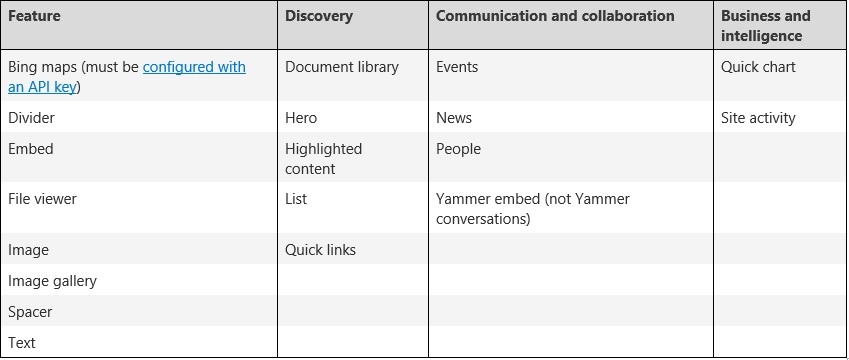
In the case of SharePoint Developers, they will be able to follow the SharePoint Framework for building custom apps which can be shown on the webpart toolbox. Our team at Dock Intranet Portal have develop four new custom webparts that can be used in the modern page layout (One of them being News Carousel).
It also supports custom extensions and use of Graph API. Developers can also see the SharePoint Starter Kit. Users can find various extensions, webparts and featured components that can be included for their custom requirements.
Mobile Responsiveness
Apart from SharePoint Classic Sites, SharePoint Modern Pages are designed to become mobile responsive. You can browse through the sites on your mobile devices seamlessly!
Wiki
Wiki Pages are important for organizations focused in Knowledge Management. However, there is no Modern version of the Wiki Page in SharePoint.
Layout
When creating a SharePoint classic webpart site, you need to select layouts that includes webpart zones to use (which might be a trouble for users when they accidently edit the zones). However, in the case of Modern Pages, the layout is very flexible, and users just need to drag and drop the webparts without any issues.
Moving to modern pages
As of now, there isn’t a way for changing classic page into modern page (unless using multi-step code solution). This is something the developers can follow for better transformation towards modern sites. If you are not an IT person, start planning for creating modern sites if required.
Microsoft Flow
If you haven’t tried Microsoft Flow yet, it’s high time you started using it! It’s awesome as SharePoint workflows and Flow are built for automating business functionalities. A perfect example is for document approval workflow. This can be configured without having the pain of relying on SharePoint Designers. This will be available for SharePoint server 2019 Public Preview. Microsoft Flow is easier to automate workflows compared to hard coded developer solutions.
Well, that’s it from our side! Hope you had a great time reading our blog series on SharePoint Server 2016 vs. SharePoint Server 2019 Public Preview! If you have any further queries, please do reach out to us at [email protected]. Cheers!