
SharePoint consists of a great pool of features and facilities. You may not need all these features frequently but at some point, each of these features can help you do things more efficiently. Document management is one area SharePoint has been doing well for a long time. One of the first steps you need to take in order to get control of the SharePoint Document Management process is to learn how to create a Document Library in SharePoint.
Today, we are presenting you with some cool information about the Document ID feature in SharePoint. Organizations and companies have used this feature for a long time to track and find documents in SharePoint. Here are 4 super tips to configure unique document IDs in SharePoint, and techniques to make the most out of it.
What is a Document ID?
The main purpose of document IDs is to help users track files without being affected by its location. It is effective, especially because even if anyone moves a file to a different site library the document ID remains the same, thus tracking it is still possible. It can also be assigned to document sets, and when a document is uploaded, a document ID is automatically assigned to it.
How does it work?
When you enable document ID service, new IDs will be assigned to the new documents in the site collection. Along with that, a new document ID column will be automatically added to the document and document set content types. Ensure that you are enabling document ID features for all relevant site collections before you start using the document ID feature in your content management system.
Moving files with a document ID
In SharePoint Online, the document ID will remain the same even when you move the file to a different location. However, when you are moving the file to a document library where the document ID feature is disabled, the file will lose its document ID tag.
When you are moving files in SharePoint Server, there is only one way to retain the document ID. Go to Site settings > Site content and structure.
Copying files with a document ID
Copying is yet another frequent activity when handling documents. By default, the new document created while copying a file will be given a new document ID. Like in the case of moving files, if you are uploading a copied file to another location where the document ID feature is disabled, the file will not have a document ID.
How to activate the document ID site collection feature
Document ID site collection feature helps track documents and records. To use this feature, you need to activate it first. There is a two-step process to enable the feature. Site collection administrators can perform these steps.
Here are the steps to activate the document ID site collection feature:
- Visit the top-level site collection.
- Choose Site actions > Site settings.
- Select Site collection features from the Site Collection Administration section.
- Click on Activate button placed next to Document ID service.
- Once activated, an active icon appears, and the document ID service is now enabled for the current site collection.
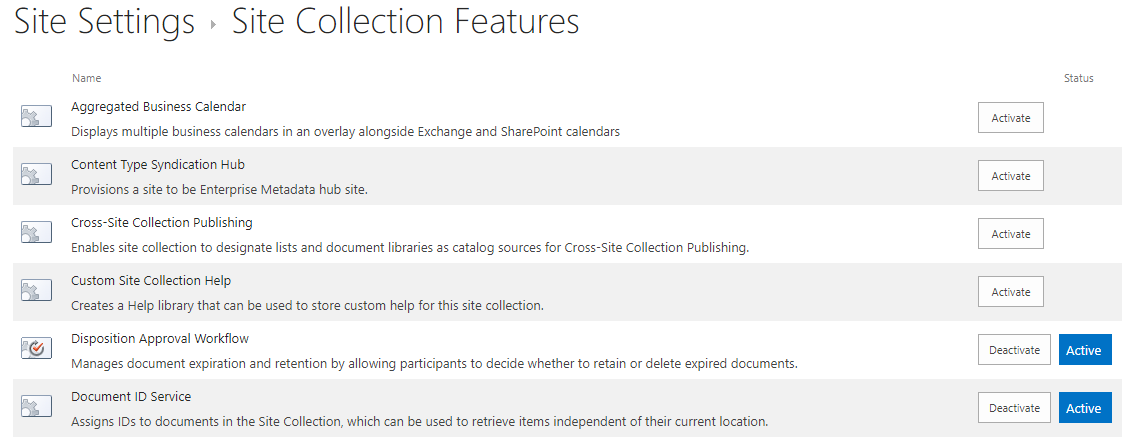
Steps to enable and configure document IDs in a site collection
The next step is to enable and configure document IDs in a site collection. As the feature is now enabled for the site collection, all documents in it will be assigned with a unique document ID automatically. The time taken for this depends on the total number of documents present in the site collection.
Follow the steps below to complete the configuration:
- Enter the top-level site collection.
- Click on Site Actions and pick Site settings.
- Choose Document ID settings options below the Site Collection Administration.
- From the Document ID settings page, select the checkbox near the Assign Document IDs.
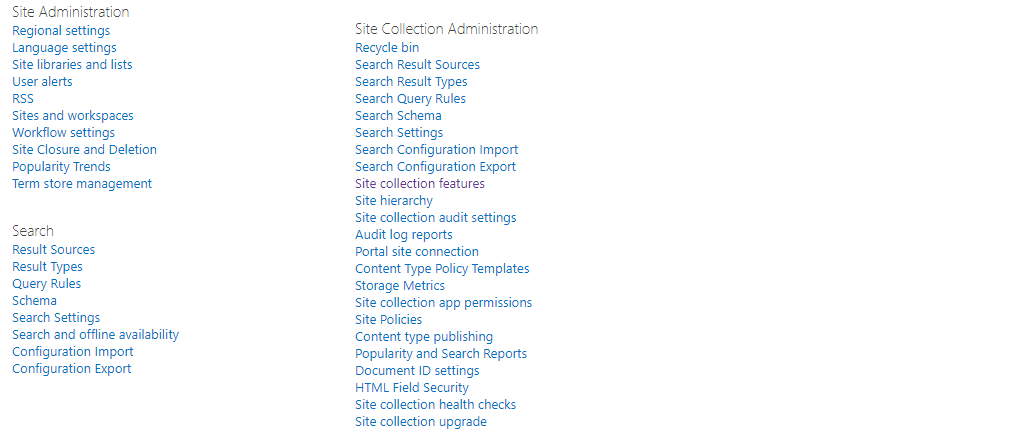
The below steps help you to set a custom string of characters or numbers to the beginning of each document ID that gets automatically generated in the future.
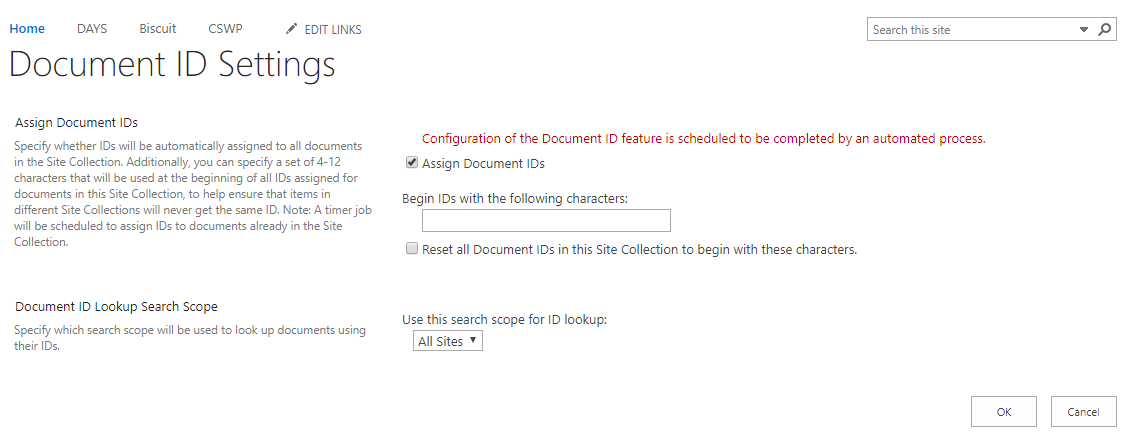
- Enter your preferred string of characters or numbers under the Begin IDs with… area.
- You can also choose the options Reset all document IDs… to automatically add the prefix to all existing document IDs in the site collection.
- You may also choose the sites to use as the search scope for ID lookup in the Document ID Lookup Search Scope sections.
Click Ok to save all changes.
Why Dock 365 is above all
Dock 365 SharePoint Intranet Portal offers a clean interface and enhanced features. Powered by Microsoft SharePoint and Office 365, Dock assures best changes to your business in terms of productivity and collaboration.