

Any SharePoint Online admin would surely want to control who can make changes on their site. For example, an admin might want employees in the research department to edit lists but employees in finance to only view it. This is where permissions and permissions levels step in.
Understanding Permissions Levels
With Permissions SharePoint users can perform certain actions like creating a site or editing items in a list. But with SharePoint, you cannot assign individual permissions to individual users. Instead, you can group related permissions together into a permission level. Thereafter you can assign the permission level to a SharePoint group.
Create a permission level
The prerequisite to create and make changes to permission levels is that you must belong to a SharePoint group that includes the permission to Manage Permissions.
Steps.
- Click Settings
 on the top-level site of the site collection, > Site Settings.
 - In the Users and Permissions section,on the Site Settings page, choose Site permissions.
- On the Permissions tab, in the Manage group, choose Permission Levels.
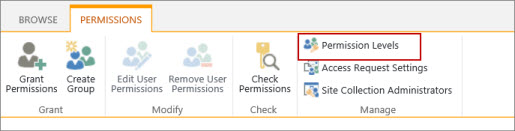
- Choose Add a Permission Level on the Permission Levels page,
- Provide the name and the description on the Add a Permission Level page
- In the Permissions area, select the check boxes next to the list, site, and personal permissions that you want this permission level to include.
- Click Create.
- Other than Full Control and Limited Access, you can make changes to any of the listed permissions levels
- Once you create the permission level, assign it to a SharePoint group.
Make changes to a permission level
The following changes can be made to a permission level:
- Update the name or description
- Add or remove permissions
Steps to make changes to a permission level:
-
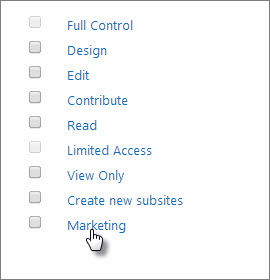
On the Permission Levels page, click the name of the permission level you want to edit. Make sure that you click on the link and not select the checkbox next to the name. For example, Marketing, as shown in the image below.
- On Edit Permission Level page you can:
- Add or remove permissions to the level.
- Change the description.
- Once you have made the changes, click Submit.
About Dock 365 Intranet Portal
Dock is a Pre-Built intranet portal for your organization. It is powered by Microsoft SharePoint & Office 365. Dock also comes with project management, contract management, and many other business productivity features. It creates sustained, connections and conversations across the organization, promoting better employee experience and organizational performance.



.webp)

