
SharePoint Online is a platform widely used by organizations to create business-to-business (B2B) extranet collaboration sites. Numerous external sharing features along with complimentary sharing features make SharePoint Online a great choice when it comes to a simple and secure B2B extranet site.
Before you start using SharePoint Online as a B2B extranet solution, there are a few things that you need to plan. Without further ado, let us get started with planning SharePoint Online as a B2B Extranet Site.
#1.Inviting external users
A key aspect of using an extranet site is managing the external users i.e. your vendors/business partners/customers. Below mentioned are three ways administrators can invite external users.
- User-initiated guest invitation model - This model is not only the default choice for a new site collection but also the recommended model. It provides users the ability to collaborate with their new business partner users without much intervention and at the same time provides control to administrators.
- Site-owner-initiated guest invitation model- If you wish to exercise more control over who can invite new users to a site then site-owner-initiated guest invitation model is for you. It only allows site owners to invite new users. Further, it prevents ad-hoc invitations from being sent out by site users.
- Admin-managed partner users model -In this model you have to pre-populate your organization's directory with the guest users, you will be inviting.You can import users from other Office 365 or Azure AD.
#2.Assigning licenses to external users
Talking about SharePoint Online, guest users only have limited capabilities. If you wish to provide the users additional functionality, see manage external sharing for your SharePoint Online environment to know more about the features and additional capabilities that can be provided. You can also assign SharePoint Online licenses to these user accounts.
.#3. Auditing and reporting of external users
Use Office 365 activity report in the Office 365 Compliance Center to view Office 365 user and admin activity within your company. You can filter the report based on criteria like date and user activity events. This helps to monitor SharePoint Online extranet invitation status i.e. who has sent invitations, and who has accepted.
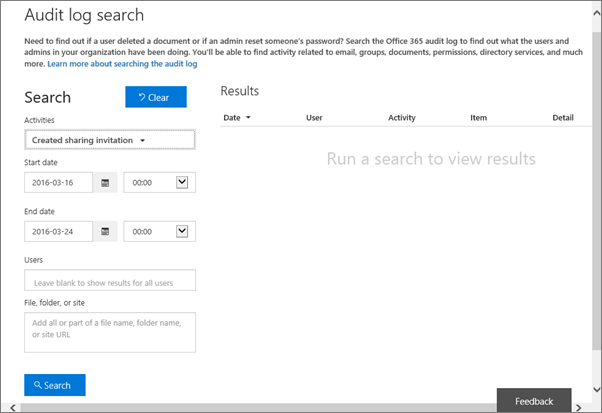
Example 1:
If you wish to create a report that shows who has sent invitations to your Extranet site and who issued the invitation, set your report filters as shown below
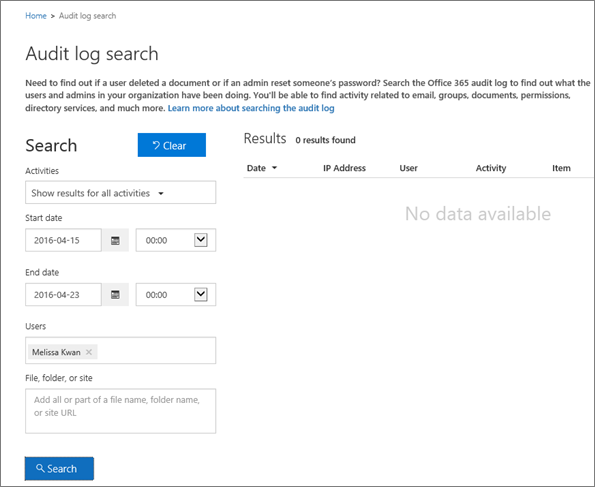
Example 2:
Set your event filters as shown below to create a report showcasing all file access activities for a an external partner,
#4.Lifecycle management of external users
Once a contract ends with a business partner it is very important to remove any access they have to SharePoint Online.Here is the checklist of actions, you need to take:
- Remove permissions-You can remove permissions from the external user's accounts that provided them access to the site(s). To do this go to Site Settings > Site Permissions > Members Page
- Delete user accounts- In case the user no longer needs access to any other resources in your organization, delete the partner users from Office 365.
- Archive- Another thing that you can do is to archive the site created for your external users in SharePoint Online.