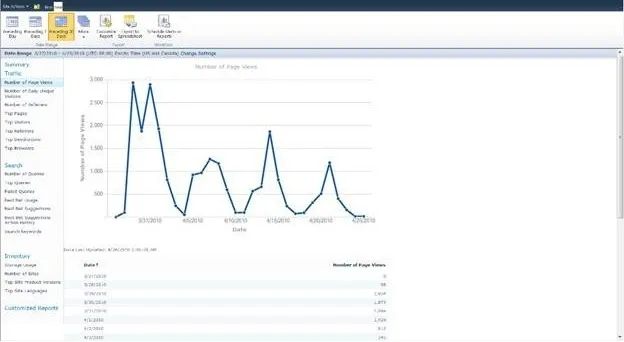

By implementing a reporting strategy, it helps you in generating a monitoring plan for adoption levels, portal content, migration processes, search features and much more! You also need to define the KPIs (Key Performance Indicators) in parallel with the analytics for tracking user performance that helps organizations empowering with intelligent data used for monitoring portals from a general viewpoint.
As you know, SharePoint and Office 365 are the most widely used collaboration platforms for content management. There’s no better alternative than SharePoint for accessing and sharing data within your team. However, I wouldn’t say it’s a success story for every organization that has chosen Office 365. So, how can help your organization measure Intranet Portal performance for evading business challenges with SharePoint Analytics?
This blog acts as a tool to walk you through SharePoint Analytics and how they can benefit your organization to generate ROI in a short span of time.
What’s Special about SharePoint Analytics?
It helps the users to get data from SharePoint usage reports so you know which business areas need help. Also, you will be able to measure the parameters for your business’s success by following a solution to perform analytics within your SharePoint Intranet Portal. Work on powerful insights and get them into action! You will be able to decide on the major steps towards building a complete digital work environment.
Why is it Used?
Your team might be facing a lot of issues when using SharePoint (especially with the senior management team). SharePoint Analytics assists them to evade most critical challenges such as inefficient searches, lower collaboration rates, unwieldly migrations lower productivity and less adoption rates.
Solving your SharePoint challenges with SharePoint Analytics:
These are the 4 major areas where SharePoint Analytics enhances SharePoint usability and reliability:
- Search
- Content
- Adoption and
- Migration
1. Search
After implementing a SharePoint Intranet Portal for your team, you need to check on your users to see if they are navigating through the portal, what exactly are their requirements and if they can find information they are looking for. You need to have a tracking mechanism to work on the user navigation paths, as well as complete search optimization reports, which are important to measure user behavior and enhance it based on the intelligent data.
2. Content
SharePoint Analytics is integrated with SharePoint and Office 365 content and site structure. It provides the user with accurate and rich reports with wide range of metrics with popular content types to number of pageviews and finding out which sites are the most popular (most number of visits).
3. Adoption
People implement SharePoint platforms with heavy customizations to align business workflows of an organization. However, user adoption becomes a challenge here. It is important to assess your SharePoint Intranet Portal’s adoption levels so you will be able to understand where your portal adoption status lies and work on the best measures for enhancements.
4. Migration
Migration is one of the most challenging areas for businesses. Once your company has decided to migrate from one platform to SharePoint, it might be difficult to adapt to the new platform. SharePoint Analytics help the organization to ease the migration process by recording interpretive information, giving you insights about your SharePoint intranet portal. It also helps you analyze and track migration steps one by one.
Solving your SharePoint Challenges with SharePoint Analytics
Hope the above information has given you enough insights to enhance your company's intranet portal. It helps provide your organization with sufficient data to make better business decisions. The analytics work by gathering data-driven insights and measuring user engagement with collaboration tools. This is vital for maintaining your Office 365 or SharePoint Portal supporting the vision of your organization’s digital environment. Your organization can realize enhanced business value and Office 365 return on investment by taking data-driven approach.