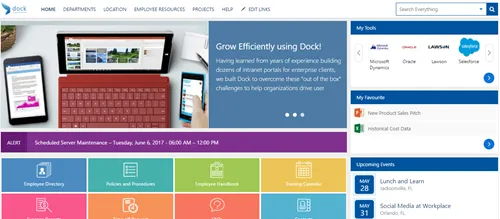
Hello Everyone! Hope you enjoyed our SharePoint Server 2016 vs. SharePoint Server 2019 Public Preview – Blog Series. Today, we’ll be talking about the self-service site creation in Microsoft SharePoint.
With SharePoint, you can have your users create their own sites and boost their collaboration levels!
Microsoft has been rolling out few improvements to SharePoint site creation features since July 2018. The below features will empower users without having the Admins configure for them:
- Setting default language for the sites they have created.
- Users can now create modern team sites even if O365 Group creation is disabled for the users.
- Enabling/Disabling Admin settings for allowing or disallowing self-service site creation. This also includes the subsites.
Let’s go with the above features in detail:
#1. Setting default language for the sites they have created
This is very important for customers who are spread across different countries/continents. Microsoft Office 365 Supports over 50 languages and for sure, companies grow, and people are going to become more diverse. Different languages need to be supported to enhance their content collaboration.
All you need to do is from SharePoint homepage, select Create Site. Give your site a name and choose Public/Private within your organization. Once done, you will be able to select the default language from the list available. This won’t override the language of the root level site.
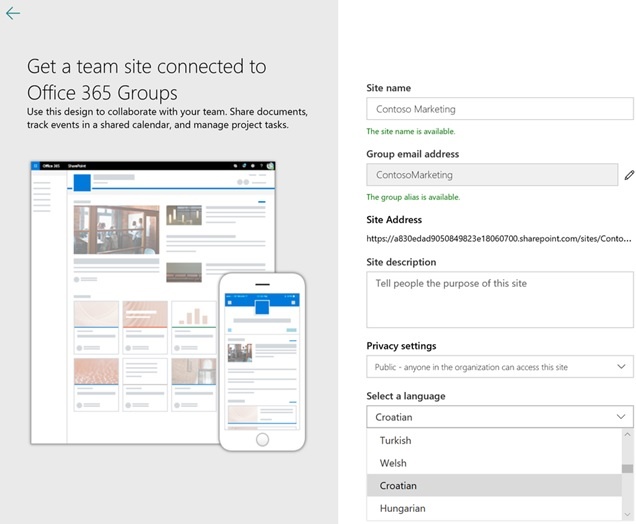 Easy to select language while creating new SharePoint Sites
#2. Users can now create modern team sites even if O365 Group creation is disabled for the users.
We talked about users creating SharePoint Sites. The SharePoint Administrators or O365 Global Administrators can decide and allow users on what type of sites they can create by their own. By default, users can create team sites and communication sites (including Office 365 Groups).
Thanks to the latest update, users can create a site easily by selecting any two options (i.e. Team Site and Communication Site) as shown in the image below.
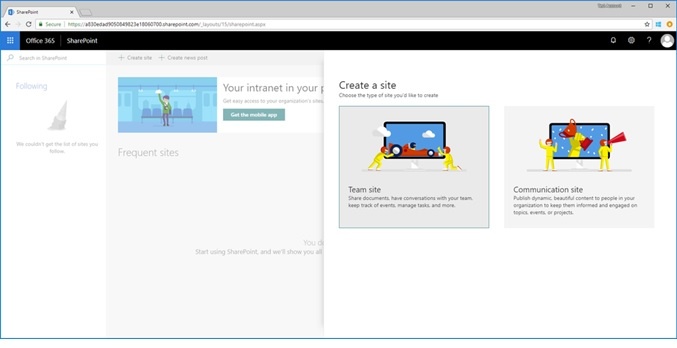
The SharePoint Modern pages users create will come with the modern user experience for the homepage that includes lists, libraries, news etc.
#3. Enabling/Disabling Admin settings for allowing or disallowing self-service site creation
Speaking from a SharePoint Admin perspective, the IT facilitates the feature for creating both Office 365 Groups and to create SharePoint Sites. The SharePoint Modern Site design doesn’t require an O365 group where admins can allow other users to take ownership of the sites within the configured governance preferences of the organization.
Site Creation – Updates
When you are in the SharePoint Admin Center (via Office 365), you will get to see the updated options within the Settings Tab. This is only visible in the classic view of admin center. Microsoft has simplified the user experience by taking off the hybrid option of classic and modern view. The service doesn’t revert to classic mode for some individuals who has planned to have modern experience for all the sites available. Even though the users can create sites from the SharePoint Home Page, the Admins can route the site creation via custom forms and logic if needed.
The best part of having this feature is to allow many of your users to create modern sites even when they are not allowed to create O365 groups.
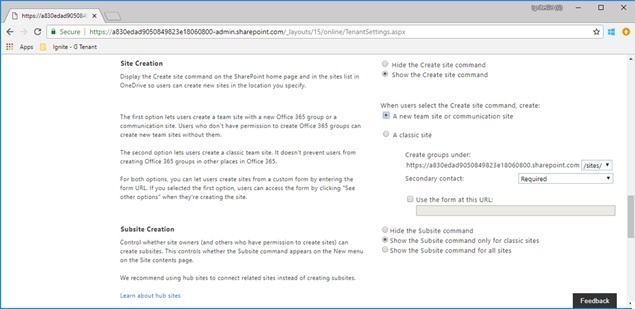
Site Creation and Subsite Creation features appearing in the SharePoint Admin Center in Office 365.
Subsite Creation – Updates
It’s high time we get encouraged to start using SharePoint Hub Sites from now. Earlier, companies used subsites for creating nested zones for various teams to work. The issue with subsites is that it gives only less space for changes/flexibility to your teams or projects. SharePoint Hub Sites are designed to help organize all the sites throughout your intranet portal.
If your company needs subsites, they will have the support. When created, it will have the modern interface view under the parent site, which would be in classic mode. All you need to do is choose the Team site from the list of classic site templates when creating new subsites from site contents page.
Microsoft has come up with couple of updates for addressing information architecture (sites too!). Earlier, subsite creation features were enabled for all Microsoft SharePoint Online sites and could be turned off for O365 group connected team sites. Admins can now control on how the subsite creation should work by choosing the options shown in the image below:
- Hide the Subsite command (doesn’t matter if the site is modern or classic)
- Showing the Subsite command only within classic sites
- Showing the Subsite command for all sites
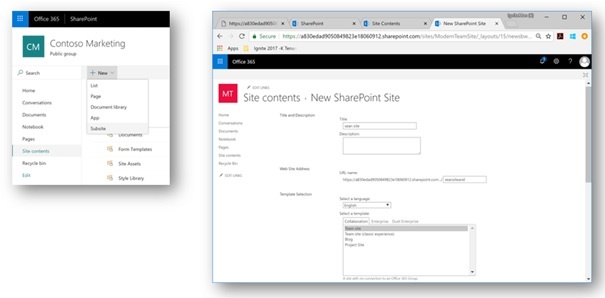
P.S: The New > Subsite option shows up as a menu option from Site contents page of a site (It can be accessed from the upper-right gear icon > site contents)