
With the new SharePoint admin center comes active sites page that lets you view the SharePoint sites in your organization. This includes the new communication sites and sites that belong to Office 365 groups. Not just that it also lets you create new sites. sort and filter sites, and search for a site.
To manage sites in the new SharePoint admin center, go to the current SharePoint admin center, click "Try it now" in the upper right and select Active sites.
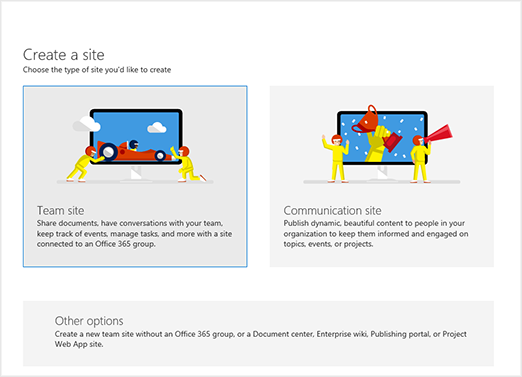
Create a site
-
Click Create.
-
Select to create a communication site or a team site (which will create an Office 365 group) or a communication site.
-
To create a site that doesn't include an Office 365 group, click Other options
Delete a site
It is now possible to delete sites that belong to an Office 365 group by Global admins and SharePoint admins. Once you delete these sites, the group and all its resources, including the Outlook mailbox,calendar, and any Teams channels will be deleted.
Steps
-
In the left column, click to select a site.
-
Click Delete, and then
-
Click Delete again to confirm.
PS.You can recover deleted sites for 93 days.
Email Admins
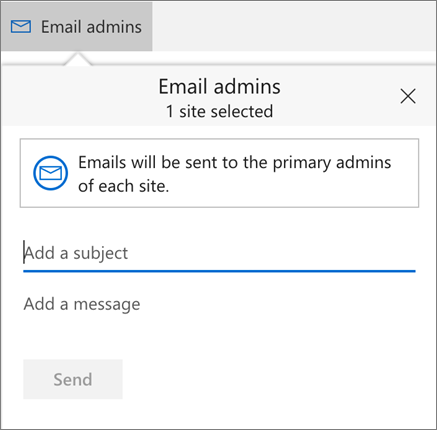
You can now email the primary admins for the sites you select. This will not include sites that belong to an Office 365 group.
PS. Users who are primary admin of more than one site will receive an email for each site.
Steps
-
In the left column, click to select one or more sites
- Click Email
-
Enter a subject and add a message
-
Click Send
Sort and filter the site list
-
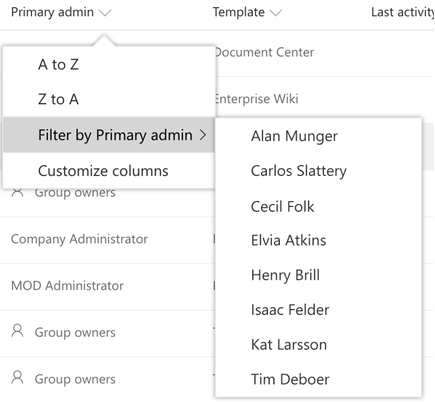
Click the arrow next to the column header
-
Select how you want to arrange the items
-
Depending on the column, you may have the option to sort alphabetically, in numeric order, or chronologically
-
If the column allows filtering, you will see a "Filter by" option
-
Select the value or values that you want to show
-
Your selections will appear with a check mark beside them
-
To clear all filters on the column, select Clear filters
Customize columns
-
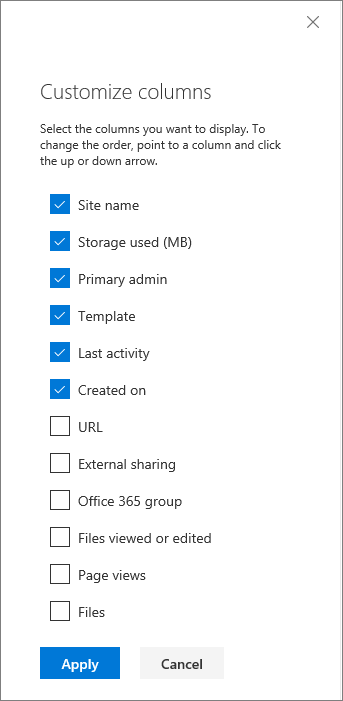
Select Customize columns by clicking the arrow next to any column header
-
To show and hide columns, select and clear check-boxes
About Dock 365 Intranet Portal
Dock is a Pre-Built intranet portal for your organization. It is powered by Microsoft SharePoint & Office 365. Dock also comes with project management, contract management, and many other business productivity features. It creates sustained, connections and conversations across the organization, promoting better employee experience and organizational performance.
Click below to schedule a Free Demo.