You are in for an important client meeting and you need the latest version of a critical project report for the meeting. You start searching for it in the likely folders and even made use of the search box to just not find the required document for the presentation.
We have all been there despite claiming that we have an organized document storage system.
Document management is critical for the success of any organization. A good document management system ensures your team collaborates well, improves overall efficiency and most importantly allows your employees to concentrate on what they do best.
Say yes to easy and hassle-free document management with Microsoft SharePoint. With document versioning in SharePoint you can easily track and manage data. When you enable SharePoint Version Control feature, new versions are added to item’s history once the changes are saved. In addition, you can also view and recover previous versions from the item's history.
How to enable and configure versioning in a SharePoint Online library?
- The first step is to navigate to the library you want to enable versioning
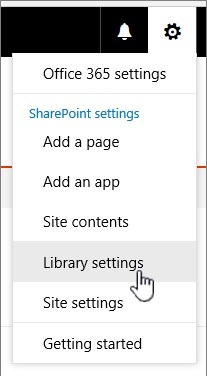
- Click Settings click Library Settings
- Click on Versioning Settings
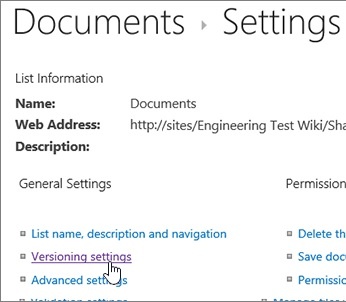
- Once you reach the Version Settings page, you will have various settings available for a document library
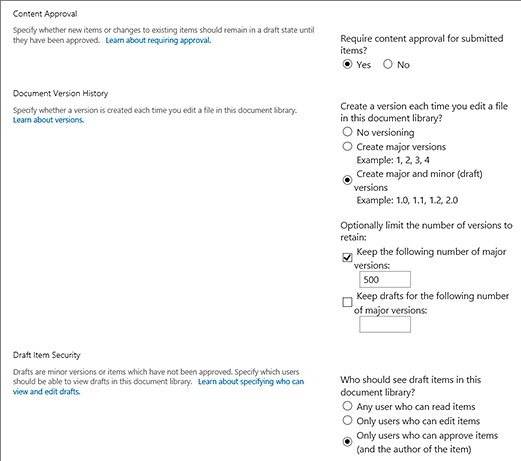
Require content approval for submitted items.
- Create a version each time you edit a file in this document library?
- You can either create major or minor versions and set the limit for the number of versions and drafts to be retained
- Users can also set who can see draft items
- Once you check the desired option click OK
How to disable versioning in a SharePoint Online library?
Follow the same steps and click No versioning in the Version settings page.
How to view, restore, or delete an earlier version in a SharePoint Online library?
- Choose the item or document for which you want to view history
- Go to the library with the item or document
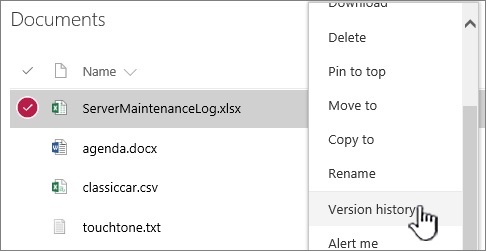
- Click the (...) next to the item
- Click Version History
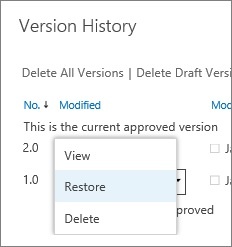
- Once you reach the Version Historydialog box, hover your mouse over the date link and click on the down arrow to see the menu
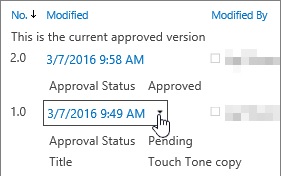
- In the menu you will see the following options:
- View
- Restore
- Delete
- Reject this version ( This only shows up for approved documents)
- Once you are done, click the X in the upper right corner.