A Change in Enterprise Content Management Strategy
Looking back since 2015, there has been a drastic change in the organization’s need for content management. Content is always a critical digital asset for every organization. How do you manage it is a tricky question. The approach begins from how you create, manage and share content. No more traditional enterprise content management techniques anymore. We need to keep up with the dynamic content services. That’s exactly we at Dock is striving for.
When we planned the product Dock, we leveraged the Microsoft SharePoint capabilities and we never had to look back. Do you know why? Keep reading to learn more.
Microsoft: The “Champ” in Content Services
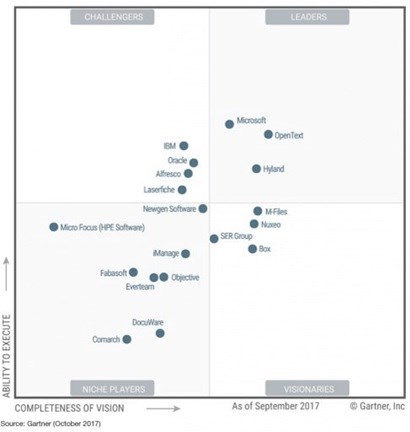
Microsoft has been chosen as “Leader in the Content Services Platform” – Magic Quadrant for 2017 by Gartner. Only 3 leaders could place themselves (including Microsoft) in the Leaders Quadrant.
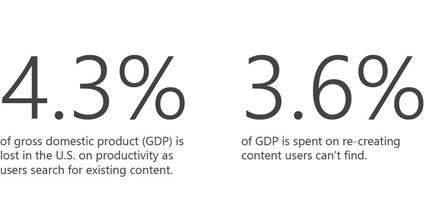
How Traditional Enterprise Content Management Can Impact Productivity
A recent study shows that the volume of unstructured content like images, docs, videos is increasing every year. By 2020, there will be an increase to over 40 billion terabytes of content in companies.
How Can Dock and Content Services Enhance User Experiences?
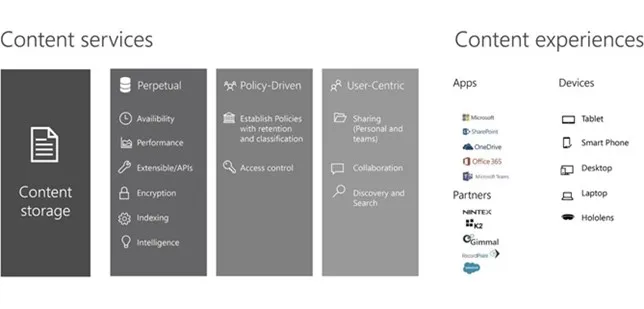
The content services provide people-centric capabilities which supplies business value throughout the workflow.
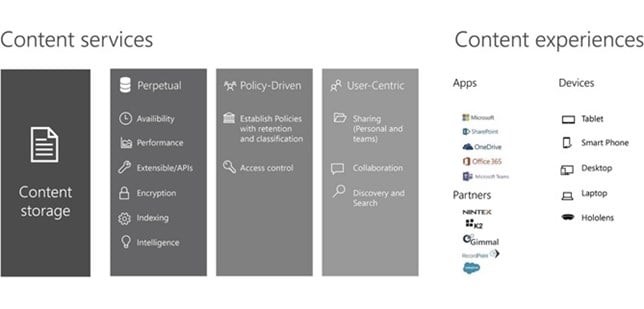
Dock has incorporated the above features in the departmental portals to boost employee productivity and collaboration.
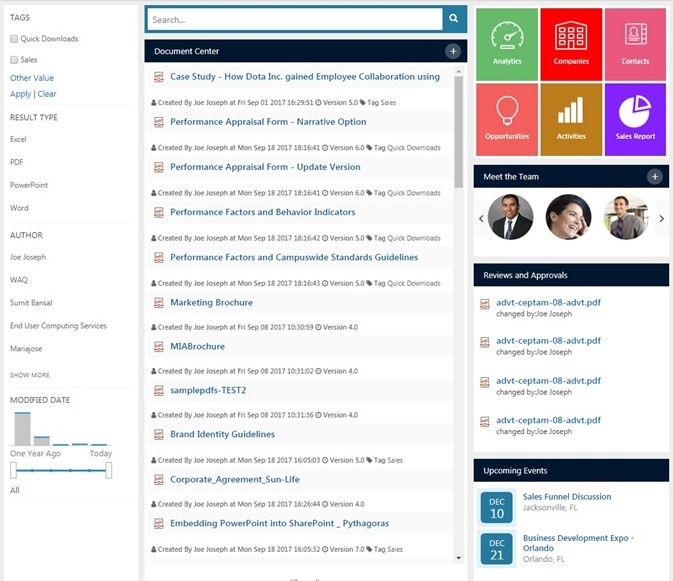
In the screenshot above, we have documents with necessary tags and version details. The left navigation shows the filter capabilities to streamline your search.
Collaborate. Communicate. Productive.
Dock is complemented with OneDrive services that are behind all Office 365 tools which includes:
- Yammer: We have added Yammer capability along with the Social Portal within Dock that helps users to connect with information across the organization, practicing best practices and creating new communities.
- Planner: The Planner feature helps the user to create latest plans, assign tasks, share files about what users are working on. You can also get updates on the task progress.
- Team Calendars: Keep your colleagues in the loop by sharing project meetings, milestones, vacation calendars (Calendar Overlays) using Outlook and Exchange integration.
Perfect Collaboration System to Grow Your Business
Some organizations have started migrating their offline content to SharePoint and OneDrive. Thanks to Microsoft for expanding the capacity to stay ahead of the growing demand.
So, what’s the good news? You can store up to 30 trillion files per tenant! As well as 25 terabytes per site collection and files up to 15 GB. Great, right?
Dock has gone beyond borders across Europe and far east markets. SharePoint is available in 40 regions globally and provides replication of storage data across different Microsoft datacenters.
Microsoft offers a perfect suite for content creation, harvesting, collaboration and security. Dock with SharePoint and OneDrive features helps you to leverage governance and security that your team requires.
Learn More: SharePoint is the Top Content Management Solution
Our team at Dock can help you get started with SharePoint by migrating your data from file servers and cloud using our flagship data migration solution MyGrator.