%20(1).webp?width=525&height=350&name=Contract%20Execution%20(1)%20(1).webp "Contract Execution (1) (1)")
Execution is the step in the contract lifecycle in which all signatories sign the contract, thus transforming it from a negotiated contract into an officially binding contract. As Cornell Law’s Legal Information Institute states, in contract law, execution involves the official signing and delivering of a contract by its proper signatories. With respect to U.S. laws, the ESIGN Act provides that electronic signatures carry the same legal validity as signatures in ink, for all kinds of business contracts. Therefore, contract execution usually involves the following steps: legal review, approval workflow, collecting signatures from all the parties involved, and the safe storage of post-execution documents and sending them out to all the parties. Typical errors at this stage may be version confusion, absence of authorized signatories, or problems with the approval workflow. Contract management software such as Dock 365 can automate the contract execution process by implementing an approval workflow, e-signature support, and full auditing history directly inside your Microsoft 365 ecosystem.
We have discussed the first three stages of contract lifecycle management: contract request, contract authoring, and contract approval. The fourth stage of contract lifecycle management is contract execution. We will cover all the important details and tasks involved in this critical stage of the contract lifecycle.
Contract lifecycle management is the detailed process of administering contracts and how contributors plan for each stage in a given contract’s lifecycle. The result of proper planning is the elimination or reduction of various contract-related risks.
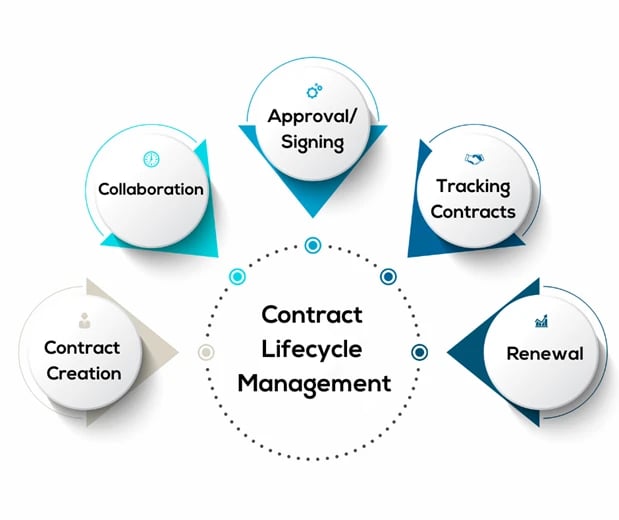
Contract execution is the fourth stage in the life cycle of a contract - the time when a contract moves from being an agreed document to becoming a legally binding obligation. Execution is not just signing but the whole process that needs to take place prior to and following the signing of the document: the approval of the final version, verification of authority, the routing of the signatures, if necessary, witnessing or notarization and finally the distribution of the document to all interested parties following execution. Execution happens when all parties sign the contract and if required deliver it. Until then, the contract is nothing more than a draft or a proposal - the parties are not obligated by the contract legally. This is very important in business - since the performance dates (payments, deliveries, services commencement), are attached to the date of execution and not the negotiation date.
During contract execution, the approved contract is delivered to the contracting parties for signature. Once the contract is approved, authorized parties will sign the contract, causing the contract to activate and thus bind parties by the terms. This is because by signing and executing a contract, you are formally initiating the agreement’s terms.
Contractual parties must ensure that they are following the terms of the contract effectively – this might look like following obligations or upholding agreed-upon schedules and payment timelines. When a party does not uphold contractual terms, then the contract may be terminated. Contracts will often include damage clauses and language that relate to contractual termination. In this way, you can end a poor partnership and get legal recourse to aid in losses that might have resulted from the breach of contract.
Today, many companies use electronic signature integrations to streamline the signing process. With electronic signature integration in your contract management software, you can send off contracts to signing parties efficiently, allowing them to sign documents on any device, at any time, and at any place.
There are basically two approaches to executing a contract: signing in ink, or wet signing, and electronic signatures. The wet signing process requires printing the contract in ink form, signing it, and exchanging either both original signed copies or signing one single original copy of the contract. Although it is legally clear in almost any jurisdiction, wet signing causes significant delays especially when the counterparties of the contracts live in different cities and even different countries and raises issues related to managing the documents physically.
Electronic signatures have gained much popularity as a way of executing commercial contracts. According to the ESIGN Act in the United States, electronic signatures have the same legal standing as traditional handwritten signatures in most commercial and consumer contracts. In the European Union, the eIDAS regulation gives legal recognition to electronic signatures in all the EU member states. There are various companies that facilitate electronic signatures such as DocuSign, Adobe Acrobat Sign, and Microsoft's e-signatures integrated into the Microsoft 365. Dock 365 connects with the most popular e-signatures providers and thus allows executing the contract within the same platform as the one used for drafting and negotiating.
A well-managed contract execution process follows a defined sequence of steps designed to prevent errors, ensure authority, and create a reliable record of execution:
Before any signature is applied, confirm that the version being circulated for signature is the final, approved version. Version confusion -where a party signs an earlier draft rather than the negotiated final - is a common and costly execution error. A CLM platform with version control eliminates this risk by locking the document once it enters the execution workflow.
Confirm that each signatory is legally authorized to execute the contract on behalf of their organization. A contract signed by someone without actual or apparent authority may be unenforceable against the organization they purported to represent. Internal approval workflows and delegation of authority matrices should be consulted before circulating for signature.
Many organizations require internal approvals - from legal, finance, or senior management - before a contract can proceed to counterparty signature. Automated approval workflows in a CLM system route the contract to the correct approvers in the correct sequence, with reminders and escalation paths for overdue approvals.
Once internally approved, the contract is circulated to all counterparties for signature. E-signature platforms route the document in the configured signing order, notify each party when it is their turn to sign, and provide a real-time status view showing which signatures have been completed and which are pending.
Once fully executed, signed copies are distributed to all parties and stored securely in the central contract repository. Dock 365 automatically stores the fully executed contract in SharePoint with all metadata intact, links it to the relevant vendor or counterparty record, and triggers any post-execution obligation tracking or renewal alerting configured for that contract type.
For a contract to be executed in a valid way, it needs to meet the legal requirements for its creation and execution according to the governing law stated in the agreement. The legal requirements that need to be fulfilled according to U.S. common law in order for a contract to be formed are an offer, acceptance, consideration, and mutual assent before the contract execution takes place; signing is the proof of fulfilling those requirements. There are types of contracts where other formalities besides signatures are needed: real estate transactions involve notarization and recording, some contracts need witnesses to fulfill their obligations, and contracts covered by the Statute of Frauds must be written and signed.
For electronic signatures, there are three requirements of the ESIGN Act, which are the consent of the signer to use electronic transactions, the fact that the signature must be associated with or attached to the contract, and that the signature must be associated with the signer by using a reliable process. Usually, all commercial e-signature solutions satisfy these requirements, because they create audit trail that records information about the signer, the method and date of signing, and the version of the document that was signed.
In an executed contract, the parties have done what was required of them. An executed contract is referred to as completed, and therefore nothing else needs to be done after the parties undertake their obligations. For instance, when you buy a product from a shop and pay for it, you and the shop have completed your part of the bargain and thus you have an executed contract.
However, in an executory contract, the party(ies) involved in the contract have not yet fulfilled their obligations. It indicates that there are ongoing activities and that the parties involved have not yet met the terms of the contract. An executory contract is open-ended until all the parties meet all their obligations. For example, when you enter into a lease contract with a landlord, the contract is referred to as an executory contract up to the end of the lease period and all payments have been made.
Therefore, the major difference between an executed contract and an executory contract is whether the contract is complete or not. An executed contract is complete while an executory contract is incomplete.
A good contract will serve as an effective way of securing all the people who are involved through outlining their rights, obligations, and ways in which they will be able to solve any dispute that might occur.
By putting together a contract, one is making sure that each person involved will make sure that he or she does what he or she is supposed to do without any mistake.
Contract formation will also serve as a way of preventing misunderstandings and misinterpretation since there will be no room for confusion. Contract formation will also make sure that each person involved in the contract will be able to hold each other responsible for their decisions.
All of the earlier phases of the contract lifecycle need to be effective for the execution of the contractual agreement to go smoothly. The terms of the contract must be precise, accurate, and fair for any party—customers, suppliers, or partners—to sign it.
Therefore, the contract execution process typically begins with drafting the contract. It involves clearly outlining the rights and responsibilities of each party, as well as any conditions or limitations. Next, the involved parties negotiate the contract.
Negotiation: During this stage, the parties involved discuss the contractual terms and resolve any disagreements or discrepancies. Negotiation is crucial in ensuring all parties agree to continue with the contract. It ensures everyone is in consensus regarding everything stated in the legal document.
Review: Relevant stakeholders review and approve the terms, conditions, and responsibilities after they are all written down. For example, legal, sales, or finance teams may need to review the document to ensure compliance and accuracy. Once all parties are satisfied with the contract, it is approved and ready for execution.
Execution: The execution of the contract involves the parties signing the contract to indicate their commitment to the obligations. All forms of signatures, whether wet, digital, or electronic, are legally acceptable methods of contract execution.
Post-signature: Following the execution, all parties must carry out the obligations outlined in the contract. They must adhere to the terms to ensure a successful business relationship. Therefore, businesses must continuously monitor the contract lifecycle to ensure parties adhere to the terms.
Contracts which do not succeed in the end usually begin experiencing problems during this phase of the contract lifecycle. The reason why a contract fails is because of the ineffective tracking of important performance indicators and milestones. Tracking important data points in smaller contracts using Excel spreadsheet and paperwork may perhaps be okay. However, in the case of complicated large contracts, this process may not be a good idea. At worst, it is just poor at best. It's really a surefire way to create confusion, misunderstanding, and missed deadlines. In order to prevent problems from occurring, using contract management software would be the best choice.
Execution, although the last phase before a contract becomes effective, is also the phase where a contract will most often encounter problems. Such problems usually include:
Version confusion: Without a controlled execution workflow, it is possible for a counterparty to sign a draft that does not reflect the final negotiated terms. This creates an ambiguity about which version controls - a dispute that may require litigation to resolve. Version-controlled CLM platforms eliminate this risk by ensuring only the approved, locked version enters the signature workflow.
Missing or unauthorized signatories: Contracts routed to the wrong person - someone who does not have authority to bind the organization - may be challenged as unenforceable. Organizations should maintain a current delegation of authority matrix and build signatory authority checks into the approval workflow before documents reach the signature stage.
Signature routing delays: Sequential signature processes in which each party must wait for the prior signer to complete before receiving the document can introduce days of delay for each additional signatory. E-signature platforms with parallel signing - where multiple parties sign simultaneously - reduce total execution time significantly for multi-party agreements.
Incomplete execution: A contract where one party has signed but the other has not is not an executed contract - it remains a draft offer. Without a tracking system, it is easy to lose visibility of contracts that have been sent for counterparty signature but not yet returned. Dock 365 provides real-time execution status tracking, alerting the contract owner when signatures are pending and automatically escalating when a deadline is approaching.

The validity and enforceability of a contract greatly depend on the execution process. When onboarding clients, vendors, or employees, you need the signing part to go down as smoothly as possible to start reaping the benefits of the contractual relationship. Contract management software can help you centralize all of your company’s contracts into a single platform, allowing you to easily retrieve, monitor, and track your contracts at any time. This helps increase visibility and increase organizational awareness of key dates to be prepared for. Contract management software is also very helpful because it allows you to create and automate notifications, alerts, and reminders of contract expiration dates and renewal dates (as well as any other key item or date). With redlining and version tracking features, everyone involved can work on the correct document version at all times, mitigating against accidental bottlenecks.
The first step to executing a contract is to speed up the review process. Businesses must set clear timelines for review and approval to prevent unnecessary delays in the contract lifecycle. They can assign responsibilities to specific team members to carry out the processes without hiccups. By establishing a structured review process, they can avoid hurdles and ensure prompt contract execution.
Solution: Dock 365 contract management software provides tools and technology to speed up the review process. Businesses can delegate review and approval to specific stakeholders to maintain accountability throughout the process. Instead of manually going through hundreds of documents, Dock 365 allows users to leverage AI contract management to extract, summarize, and compare contracts. It fast-tracks the process considerably and reduces the possibility of human error.
Businesses must conduct a thorough legal review before signing the contract. If the contractual agreement fails to comply with legal, organizational, and industrial standards, enforcing them can be an uphill battle. They must ensure the terms and conditions are clear, precise, and legally binding. Legal supervision can mitigate the risk of disputes and guarantee a contract’s legal validity. However, legal departments cannot always oversee the entire contract lifecycle, especially as portfolios grow.
Solution: Organizations can guarantee the competence of contracts by standardizing the drafting process across the board. Dock 365 provides pre-written templates for diverse purposes, including SOWs, SLAs, NDAs, employment agreements, etc. They can also include relevant terms and conditions from the clause library. Thus, businesses can create legally valid and qualified contracts without constant legal intervention.
Make the contract signing process as simple as possible to accelerate execution. Wet signatures and document scanning can be time-consuming for contracting parties. Moreover, it’s harder to keep track of contract status when processes take place via email or shared files. It can cause delays, miscommunication, and disputes in the contract lifecycle.
Solution: Businesses can utilize electronic signature solutions to ensure a painless signing process. Electronic signatures are legally binding and can streamline the signing process, allowing all parties to sign the contract quickly and efficiently. With little effort, they can sign a contract anytime, from any device. Electronic signature solutions like DocuSign, Adobe Sign, and Sertifi enable organizations to scale execution.
Identifying and establishing the signatories of a contract is crucial to its execution. Businesses must clearly define who has the authority to sign the contractual agreement to ensure signatories know their responsibilities. Establishing signatories upfront can prevent confusion and expedite the signing process. Organizations can also implement sequential or parallel signing orders to ensure that all relevant stakeholders are involved.
Solution: Electronic signature solutions allow businesses to assign signatories for a particular contract. Users must add their name and email address, and the platform will send the relevant documents to signatories for signing. It also enables businesses to set signing orders for all their contracts. They can add a list of signatories and sequence them to streamline the execution process.
When there are multiple stakeholders or documents to review, approve, and sign, it can be demanding to navigate the process. It can be time-consuming to route contracts through signatories and can set back processes. Moreover, manual contract execution is prone to errors, leading to costly disputes and delays.
Solution: Automated workflows can significantly reduce the time it takes to move a contract from negotiation to execution. They can ensure that all steps in the contract execution process are followed accurately and consistently, reducing the risk of mistakes. All stakeholders have real-time visibility into the status of a contract, including upcoming deadlines and pending approvals.
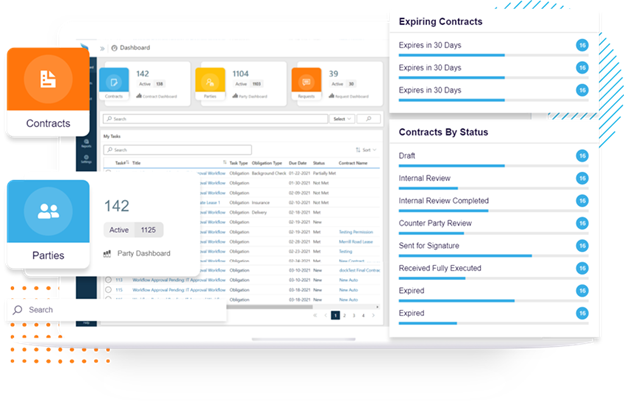
Tracking your contracts has never been simpler with the help of a user-friendly dashboard provided by your contract management software system. In addition, you can analyze data on demand and create thorough, detailed reports.
Solution: Contract management software also helps to automate many steps and processes within contract lifecycle management. During the signature step, your contract lifecycle management software helps to ensure that signatures are compliant. To add, your software automatically sends off requests for signing once the document has been approved.

Organizations that manage high contract volumes or operate in regulated industries benefit from standardized execution practices that reduce risk and improve efficiency:
Use electronic signatures for all eligible contracts: The ESIGN Act and equivalent international legislation make e-signatures legally equivalent to wet ink for the vast majority of commercial agreements. Electronic execution eliminates postage delays, reduces the risk of lost originals, and generates a tamper-evident audit trail automatically.
Require internal approval before external circulation: Contracts should complete all internal approvals - legal review, finance sign-off, management authorization - before being sent to counterparties for signature. Reversing a signature process because internal approval was overlooked is disruptive and damages counterparty confidence.
Lock the document version before initiating signature: Once a contract enters the signature workflow, no further edits should be possible. Version locking ensures that the signed document matches exactly what was negotiated and approved, providing a clean evidentiary record if the contract is later disputed.
Store executed contracts centrally with full metadata: Organizations that store contracts in centralized, searchable repositories with structured metadata - counterparty, value, start date, expiration, governing law - are significantly better positioned to manage obligations and renewals proactively than those relying on email attachments or shared drives.
Maintain the execution audit trail: The audit trail generated during e-signature - recording each signer's identity, location, time of signing, and the document version signed - should be preserved alongside the executed contract. This record is the primary evidence of valid execution in the event of a dispute.
By utilizing a CLM software solution for contract execution, companies can eliminate the risks that arise from manual hand-offs and process inefficiencies inherent in manual execution. With CLM software, the entire execution process – starting from routing of the contract for internal approval to collection of signatures to post-execution storage and obligation triggering – becomes automated and governed as a single process.
Dock 365 is built natively on Microsoft SharePoint and Microsoft 365. This means execution processes happen in the very same environment where drafting and negotiation happen. No export and re-imports are required to collect signatures or to store a document after it has been executed. Key capabilities of Dock 365 that pertain to contract execution include: configurable workflows allowing to route the contract to the proper internal approvals in the right order prior to executing the contract; integration with leading e-signature service providers for collecting signatures from the counterparties; automated post-execution storage in SharePoint with all metadata and version control; and an audit trail of all activities from drafting through execution. Since all your data stays within your Microsoft 365 tenant, your contract data never leaves your organization's environment.
Pricing for Dock 365 depends on user volume and the features required - contact Dock 365 directly for a customized package that matches your organization's contract volume and workflow complexity.
The introduction of electronic signature solutions has changed the game in contract lifecycle management. Utilizing an electronic signature solution can reduce turnaround times and shorten the duration of the signing process. Electronic signatures are also far more secure than conventional, wet signatures.
Dock leverages the Sertifi eSignature solution, offering a user-friendly way to sign contracts on the go in today’s digital landscape. Manual signature processes are both risky and time-inefficient, so leveraging an electronic solution is certainly the direction to move toward. Manual signature processes cause delays and create unnecessary roadblocks that can lead to significant amounts of time wasted.
Once the contract is signed, the updated document is uploaded to your contract repository. You can additionally track the status and location of the contract easily within your contract lifecycle management platform. Since the 2000 E-SIGN Act, electronic signatures have been legally binding, providing a secure and rapid way to collect signatures.
To further illustrate, electronic signatures can save significant amounts of time by eliminating the need to physically sign, print, mail, scan, or email documents. Contracts sent for signature are often shared in a PDF or Word document format from your contract management software, allowing the necessary parties to access and sign the document. After the contract is signed, you can track, route, and file the document for easy review at any time.
In your contract management system, you can quickly conduct filtered and customized full-text searches to locate files instantly. With the assistance of cloud security and permissions-based settings in your contract management software, you can ensure that all of your organization’s documents are safe and sound in the cloud.
Contract execution is a very important part of contract lifecycle management since it is at this point that contract execution kicks off and begins. Using automated workflows, integration of electronic signatures, central hub where all of your collaboration around contracts is managed, and many other functionalities, you will be able to deliver a great solution for contract management. Here at Dock, we would like to ensure that you have complete confidence in your contract management system's precision, compliance, and value. Through process centralization and automation for contract execution and signing, you will be able to enjoy the optimized contract execution stage and deliver a great experience to all of your stakeholders.
Dock 365 Contract Management System makes contract management easy for contract execution stage in contract lifecycle. Dock helps to equip your contract management team, vendors, and clients with fast contract execution and signing capabilities.
Continue your exploration of Stages of Contract Lifecycle Management with Dock 365 - Contract Storage.
Ready to get started today? Reach out to us to learn more about our Dock 365 Contract Management System.
If you would like more information, we welcome you to schedule a free demo with us today.